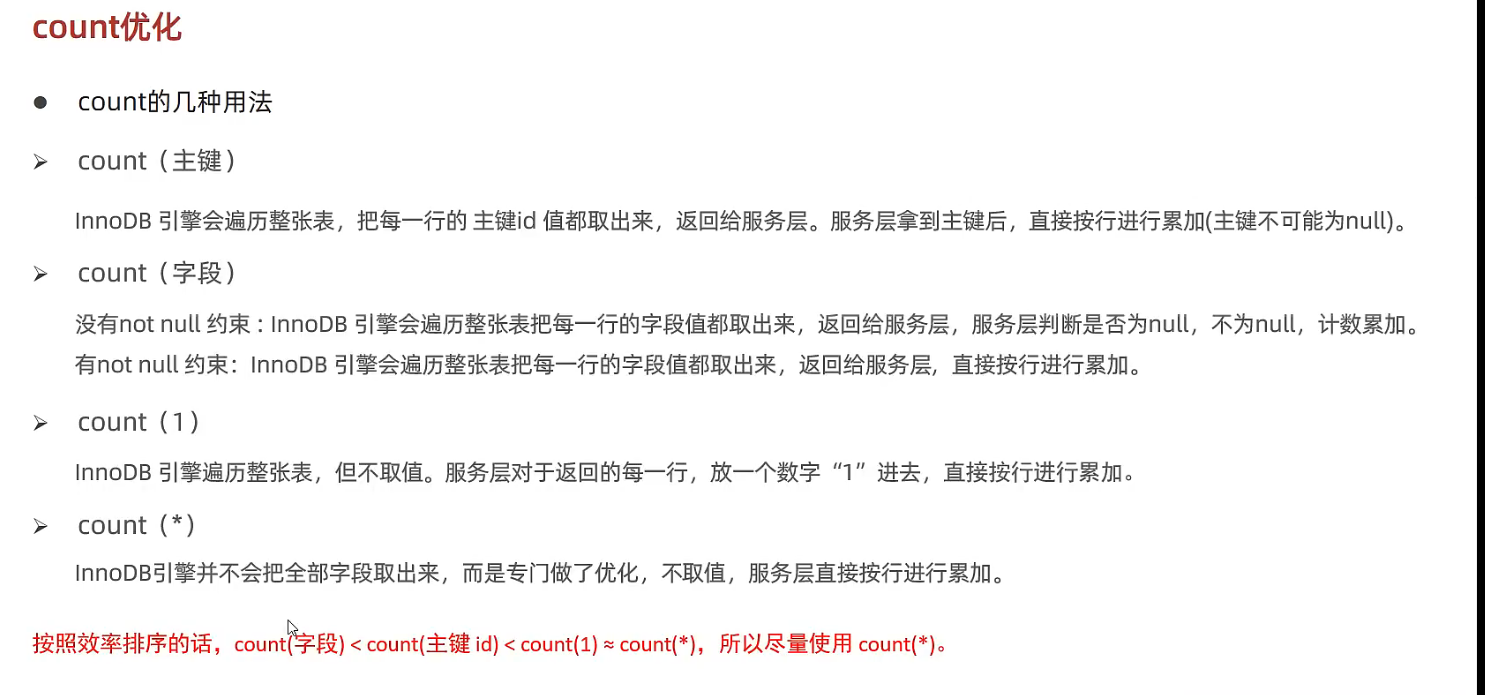
const:唯一索引查询 (select * from table_name where id = 1)
ref:非唯一性索引查询 (select * from table_name where name = “zs”)
eq_ref: 连表查询的等值比较有唯一索引(select a.*, b.* from a,b where a.id = b.id 如果a.id是a唯一索引,则a为eq_ref )
range: 范围查询,range类型表示使用索引返回一个范围中的行。通常在查询中使用比较运算符(如 >, <*, *>=, <=*, *BETWEEN*, *IN*)时会出现这种情况。例如:`EXPLAIN SELECT * FROM account WHERE id > 1; 在这个查询中,id* 列有一个索引,MySQL 使用 range 类型来查找 id 大于 1 的所有行
index:用了索引,但遍历整个索引树 (select * from table_name)
all: 全表扫描
possible_key: 显示可能应用在这张表上的索引,一个或多个
key: 实际用到的索引
key_len: 使用的索引字节数(索引最大可能长度)越短越好
rows:预估值,需要执行查询的行数
filtered:查询结果行数占读取行数的百分比%
Extra: 额外信息
2.6 索引使用
在未使用索引时,执行如下sql效率低
1
SELECT * FROM table_a where name = "zs";
针对name字段建立索引
1 2 3 4
CREATE INDEX idx_a_name on table_a(name); # 注意:创建索引也需要耗时(构建B+树数据结构)
# 1. 联合索引全部生效 SELECT * FROM table_a where name = "zs" and age = 18 and gender = "man"; SELECT * FROM table_a where age = 18 and gender = "man" and name = "zs"; # 也会生效,因为name存在
# 2. 联合索引部分生效 name字段生效 SELECT * FROM table_a where name = "zs" and gender = "man";
# 3. 联合索引全部失效 SELECT * FROM table_a where age = 18 and gender = "man";
范围查询
联合索引中,如果出现范围查询(>,<),范围查询右侧的列索引将失效
1 2 3 4 5
# 最右侧列 gender 失效 SELECT * FROM table_a where name = "zs" and age > 18 and gender = "man";
# 使用大于等于 >= 则不失效 SELECT * FROM table_a where name = "zs" and age >= 18 and gender = "man";
索引列运算
不要在索引列上进行运算操作,否则索引会失效
1 2
# 索引name失效,不走索引 SELECT * FROM table_a where SUBSTRING(name,1,1);
字符串查询需要加引号
字符串不加引号时,有时SQL也会执行,但是索引失效
1 2
# 背景:phone是索引字段 SELECT * FROM table_a where phone = 123; # 隐式类型转换,索引失效
% 模糊查询
头部模糊匹配,索引会失效。如果是尾部模糊匹配,索引不失效
1 2 3 4 5
# 头部模糊匹配,索引失效 SELECT * FROM table_a WHERE name like '%三'; # 全表扫描 ALL
# 尾部模糊匹配,索引不失效 SELECT * FROM table_a WHERE name like "张%"
OR连接的条件
使用OR语句,如果OR前后都有索引,索引才会生效
1 2 3 4 5 6 7
# 背景 id 和 name为索引字段, home为普通字段
# 索引生效 SELECT * FROM table_a where id = 1 or name = "zs"; # 使用到两个索引
# 不走索引 SELECT * FROM table_a where name = 'zs' or home = 'china'; # 全表扫描,使用0个索引
数据分布影响
如果MySQL评估使用索引比全表查询更慢,则不使用索引;
即:
如果查询最终的结果数量超过了全表的一半则不走索引, 使用全表查询
如果查询的最终结果数量小于全表的一半, 则走索引
1 2
# 不走索引 explain select * from pms_attr where attr_id is not null;
SQL语句添加索引提示
多个索引都可能用到的情况下, MySQL会进行自动选择.
也可以给MySQL提示使用哪个索引.
USE INDEX 建议使用某个索引
1
SELECT * FROM table_a USE INDEX(idx_name) where name = "zs";
IGNORE INDEX 不使用某索引
1
SELECT * FROM table_a IGNORE INDEX(idx_name_age_gender) WHERE name = "zs";
FORCE INDEX 强制使用某个索引
1
SELECT * FROM table_a FORCE INDEX(idx_name) WHERE name = 'zs';
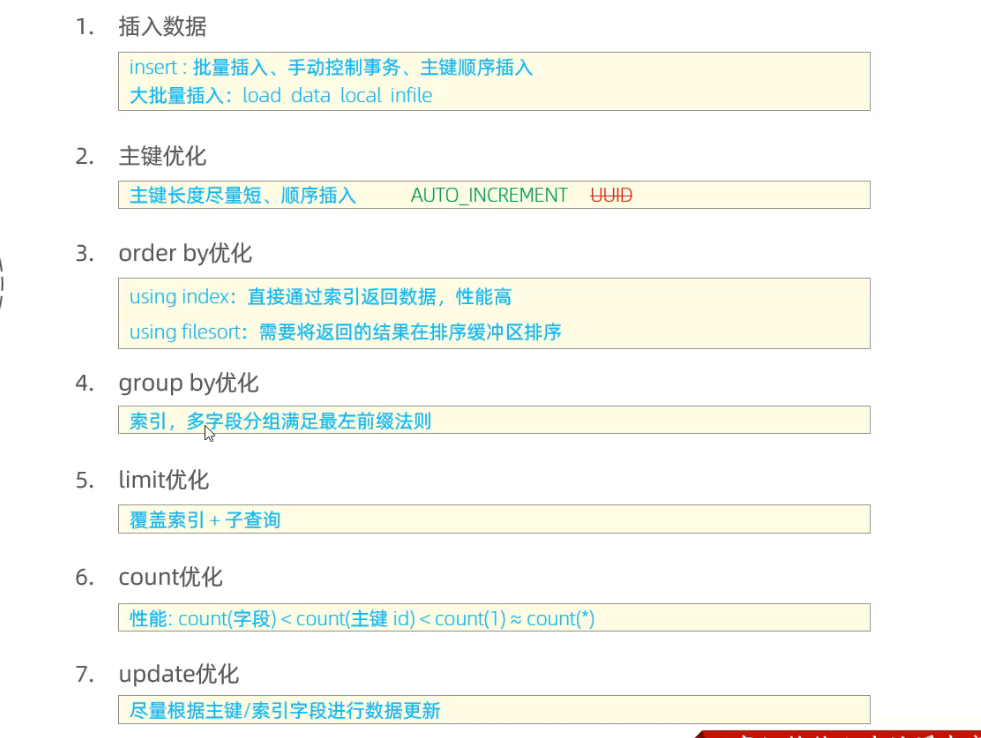
START TRANSACTION; DROPPROCEDURE IF EXISTS insert_10W; DELIMITER ;; CREATEPROCEDURE insert_10W() begin declare i int; SET i =1; WHILE i <=100000 DO INSERTINTOuser (id,name, age,dpt, date) VALUES (i, CONCAT('name_', i), i %120, CONCAT("dpt", i), DATE_ADD(CURDATE(), INTERVAL i DAY)); SET i = i +1; END WHILE; END;; DELIMITER ; CALL insert_10W(); COMMIT;
开启trace
1
2
3
4
5
6
set session optimizer_trace="enabled=on",end_markers_in_json=on; -- 开启trace
# 1. 连接服务器时,加参数 mysql --local-infile -u root -p # 2. 设置全局参数local_infile = 1; 开启从本地加载文件的开关 set global local_infile = 1; # 3. 执行load指令将准备好的数据加载到表结构中 load data local infile "/root/sql.log" into table table_name_a fields terminated by ',' lines terminated by '\n';
3.2 主键优化
数据组织方式
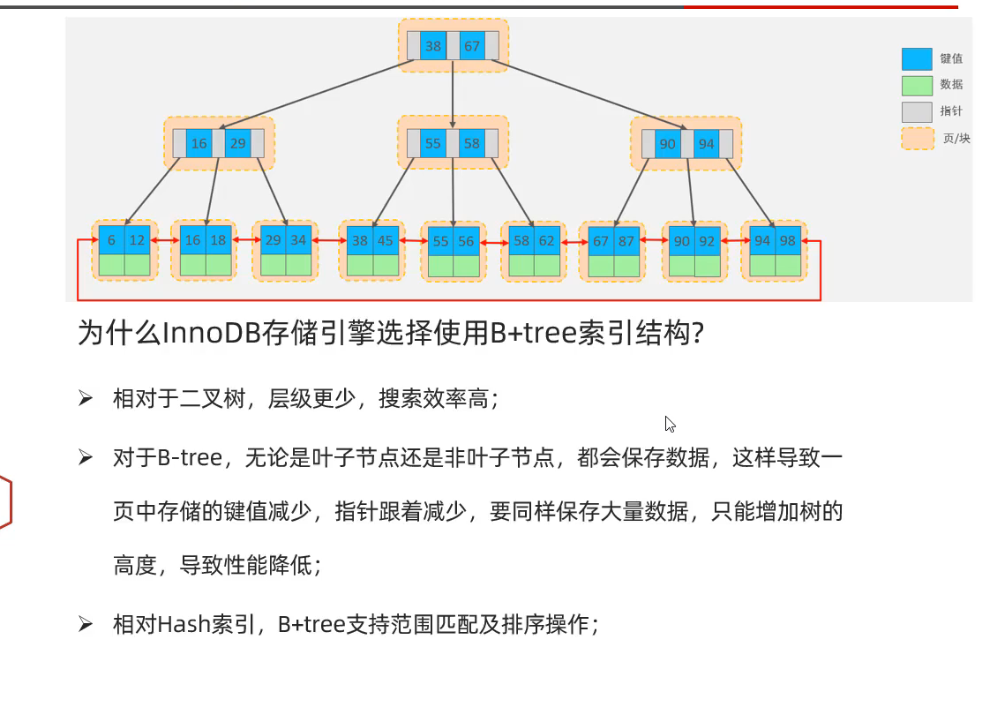
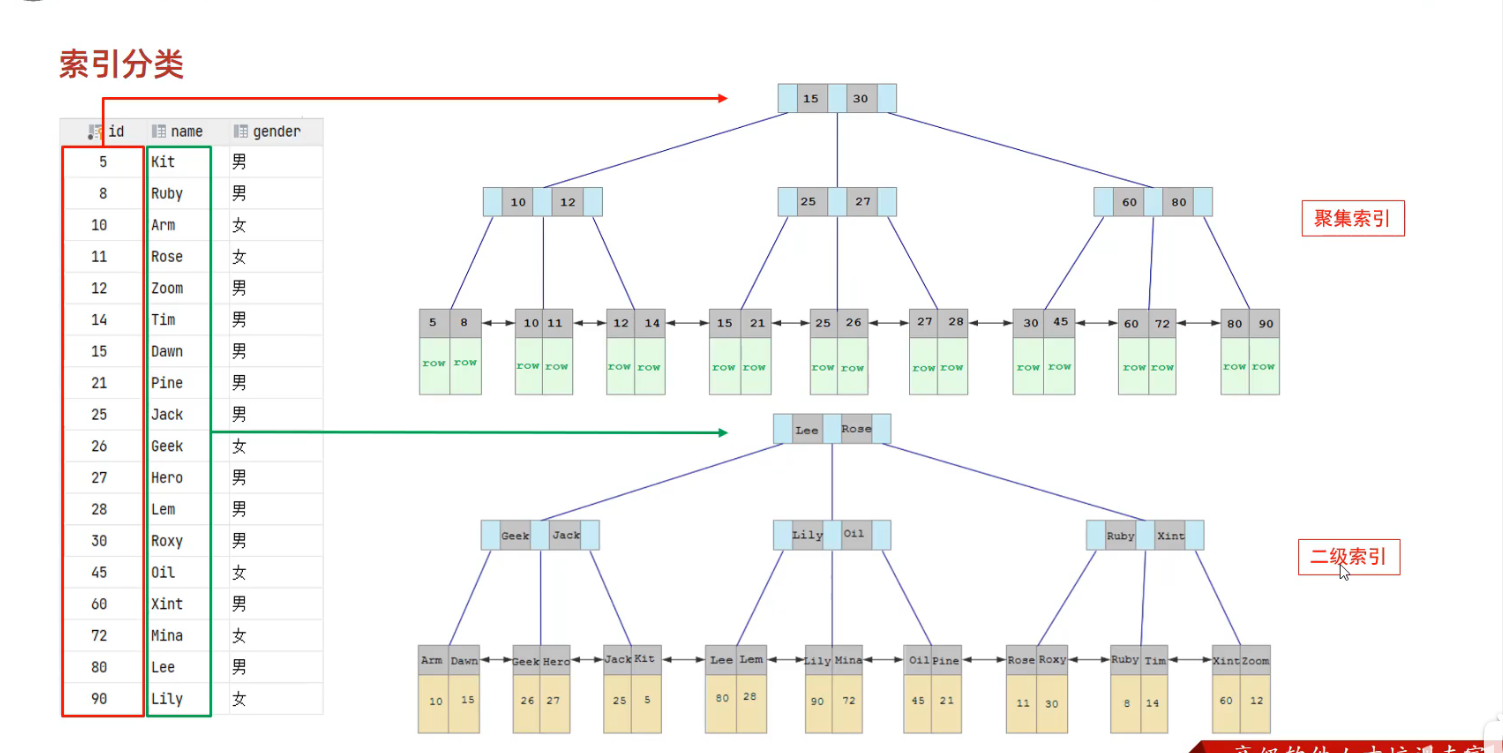
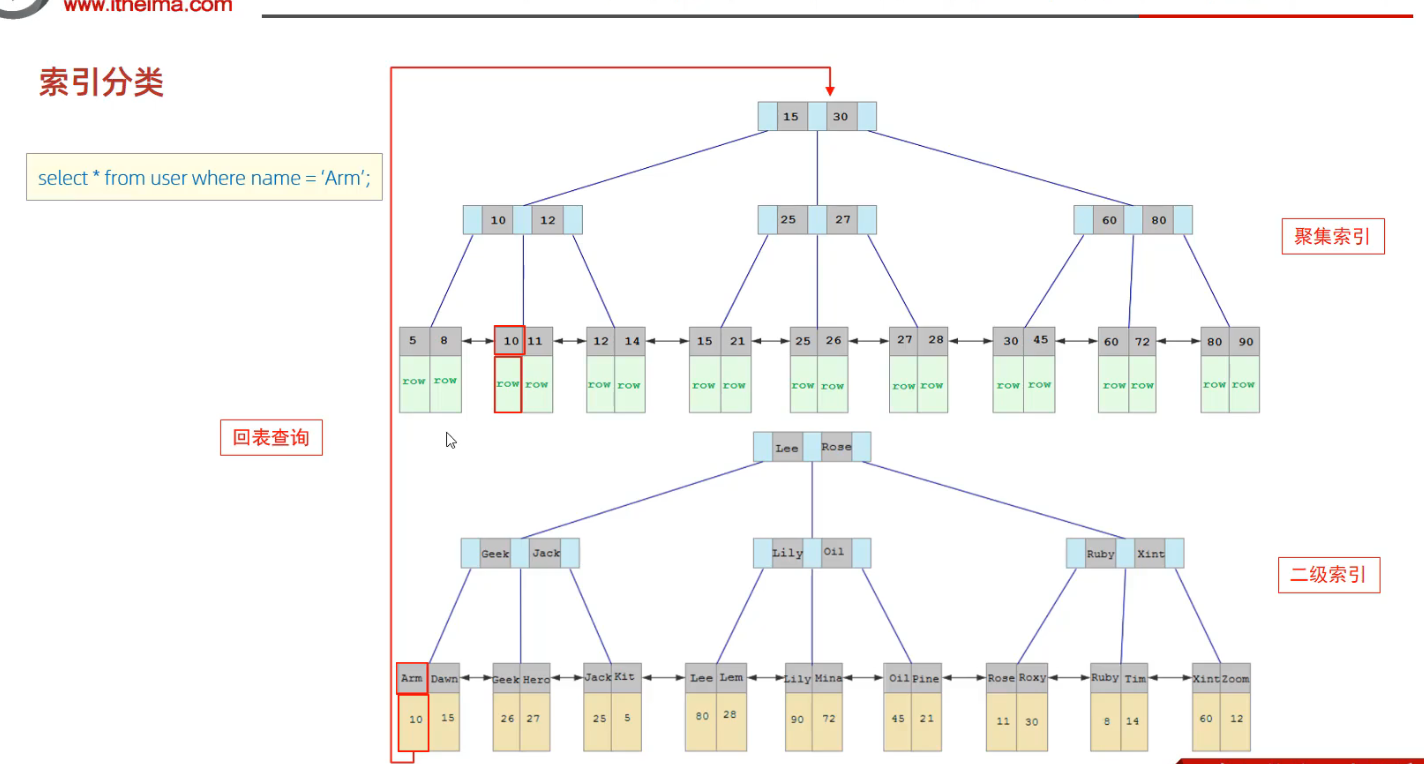
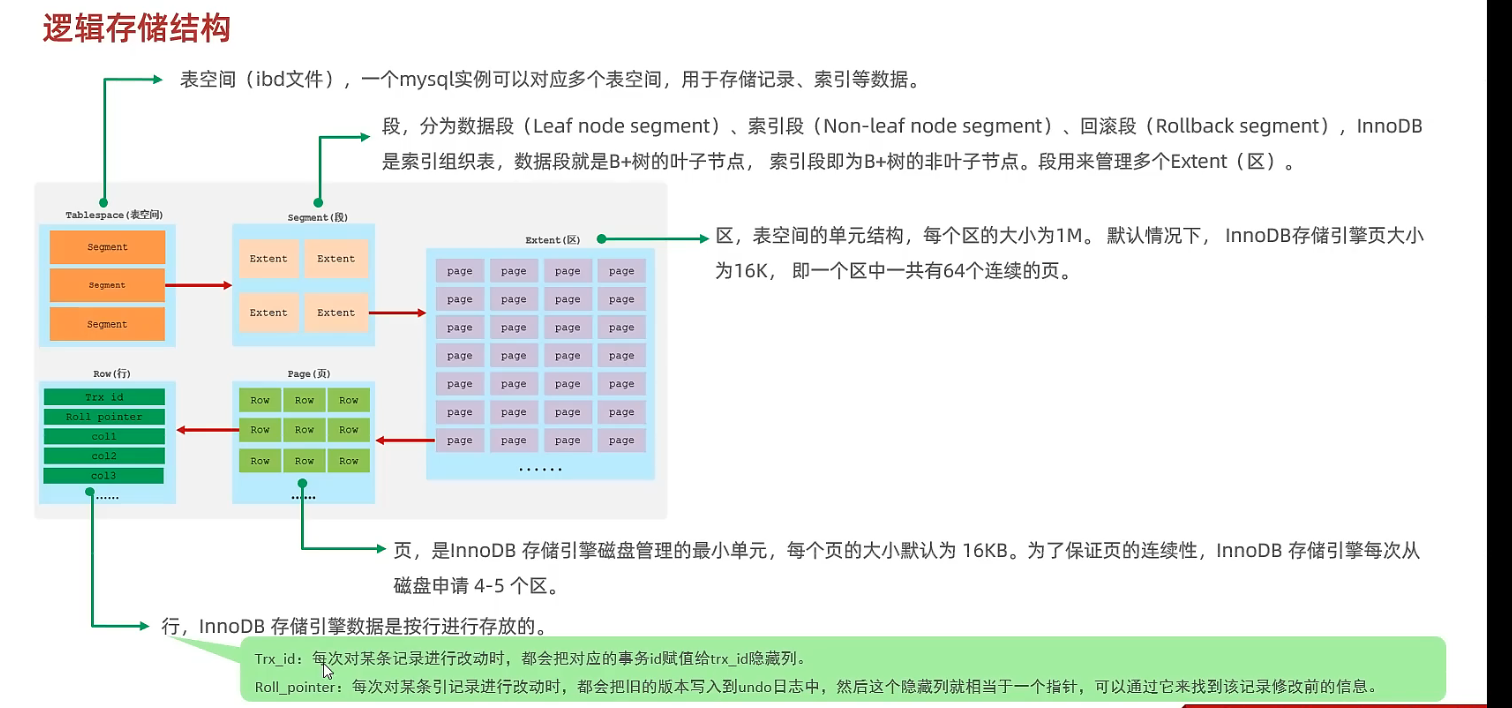
innodb中, 表都是根据主键顺序组织存放的, 这种表是索引组织表(IOT).
页分裂
主键如果不按照顺序插入, 就可能会导致页分裂
页合并
删除数据时, 如果某个页中的记录小于阈值(默认50%), 则可能发生页合并
主键设计原则
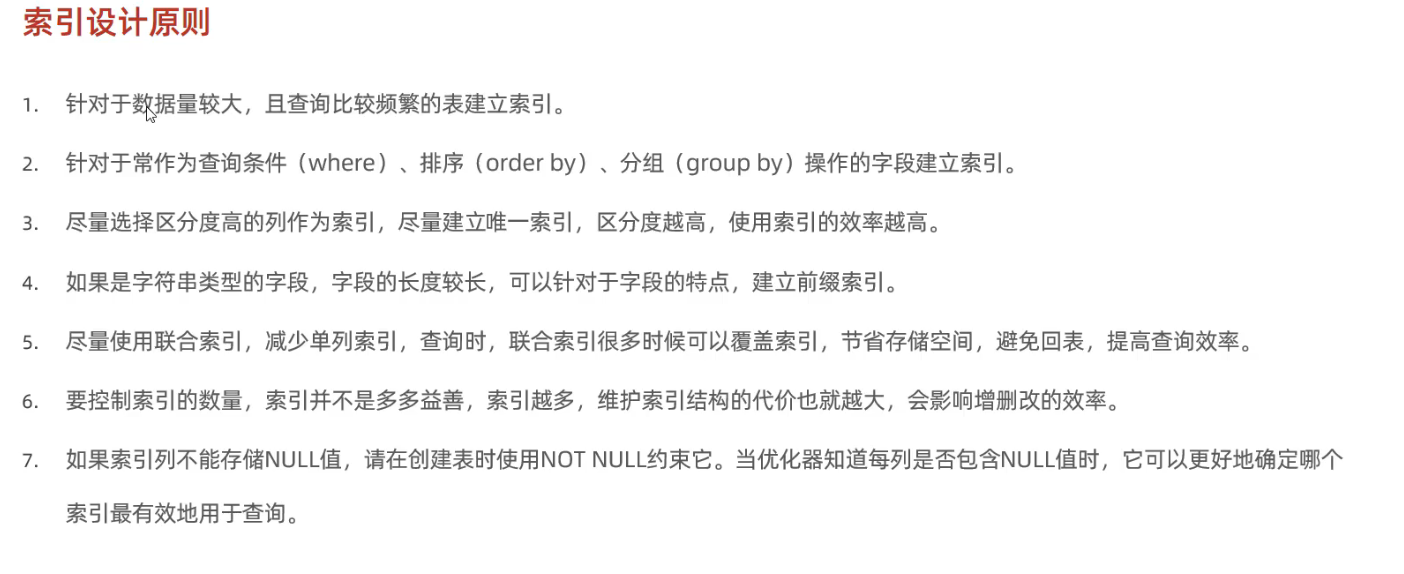
满足业务需求的情况下,尽量降低主键的长度
插入数据时,尽量选择顺序插入,选择使用AUTO_INCREMENT自增主键
尽量不要使用UUID做主键或者是其他自然主键,如身份证号 (无序,且长度太长)
业务操作时,尽量避免对主键的修改
3.3 order by优化
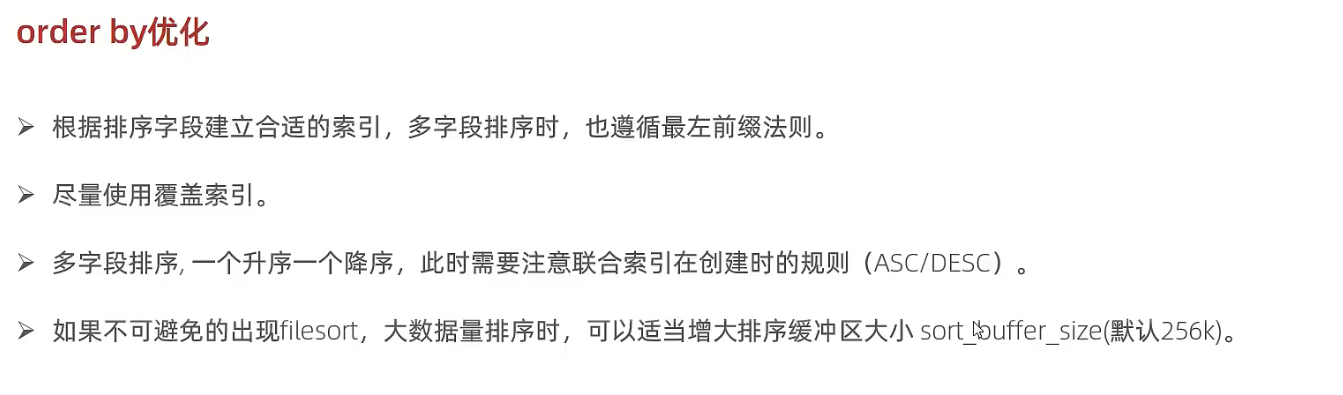
Using index:效率高,通过有序索引顺序扫描, 直接返回有序数据
Using filesort: 不通过索引顺序排序, 效率低
1
CREATE INDEX idx_age_name on table_a(age asc, name desc);
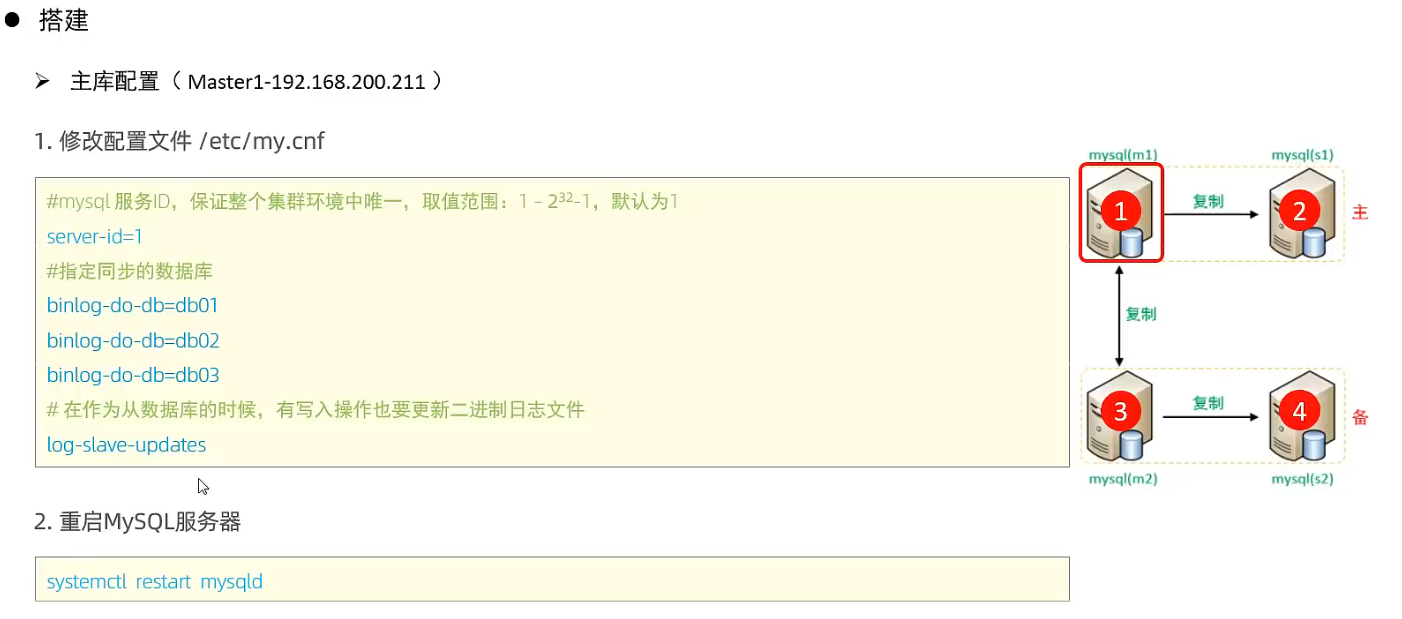
# # Remove leading # and set to the amount of RAM for the most important data # cache in MySQL. Start at 70% of total RAM for dedicated server, else 10%. # innodb_buffer_pool_size = 128M # # Remove leading # to turn on a very important data integrity option: logging # changes to the binary log between backups. # log_bin # # Remove leading # to set options mainly useful for reporting servers. # The server defaults are faster for transactions and fast SELECTs. # Adjust sizes as needed, experiment to find the optimal values. # join_buffer_size = 128M # sort_buffer_size = 2M # read_rnd_buffer_size = 2M
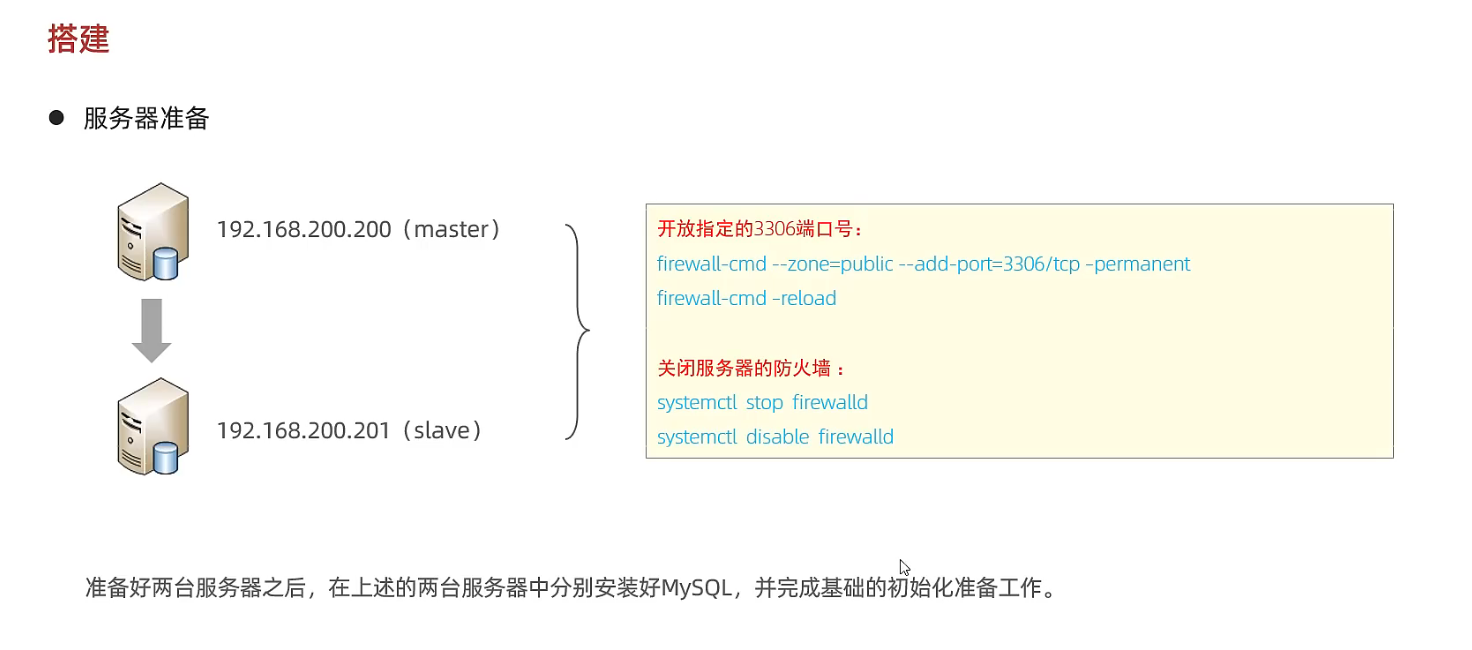
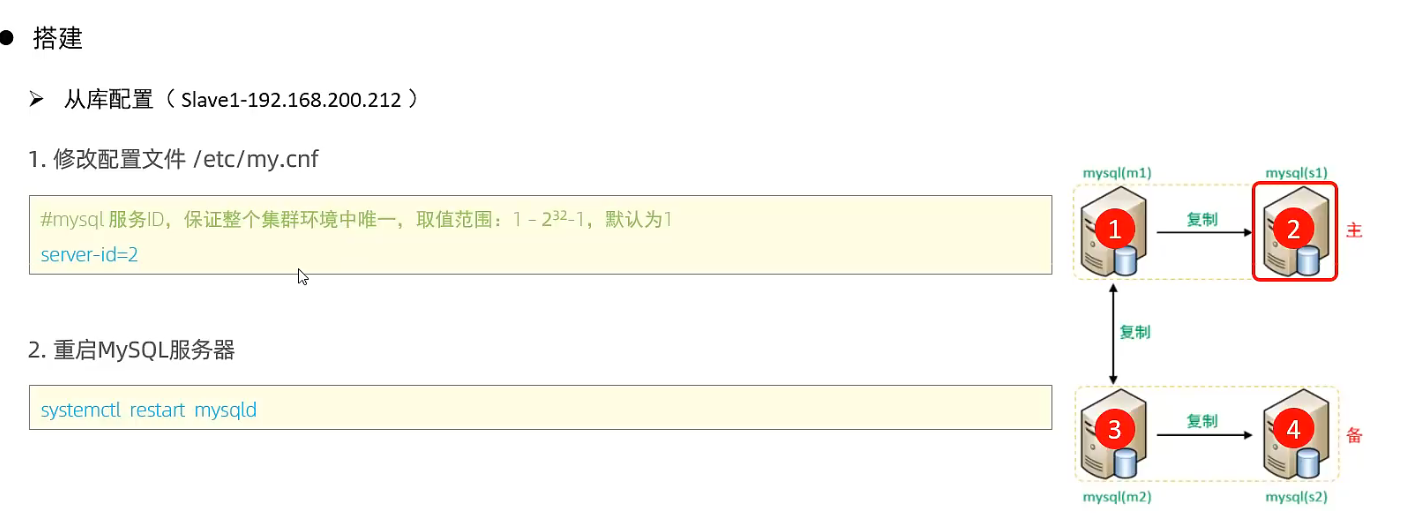
SHOW VARIABLES LIKE 'server_id'; # 确保read_only 不是OFF show global variables like "%read_only%";
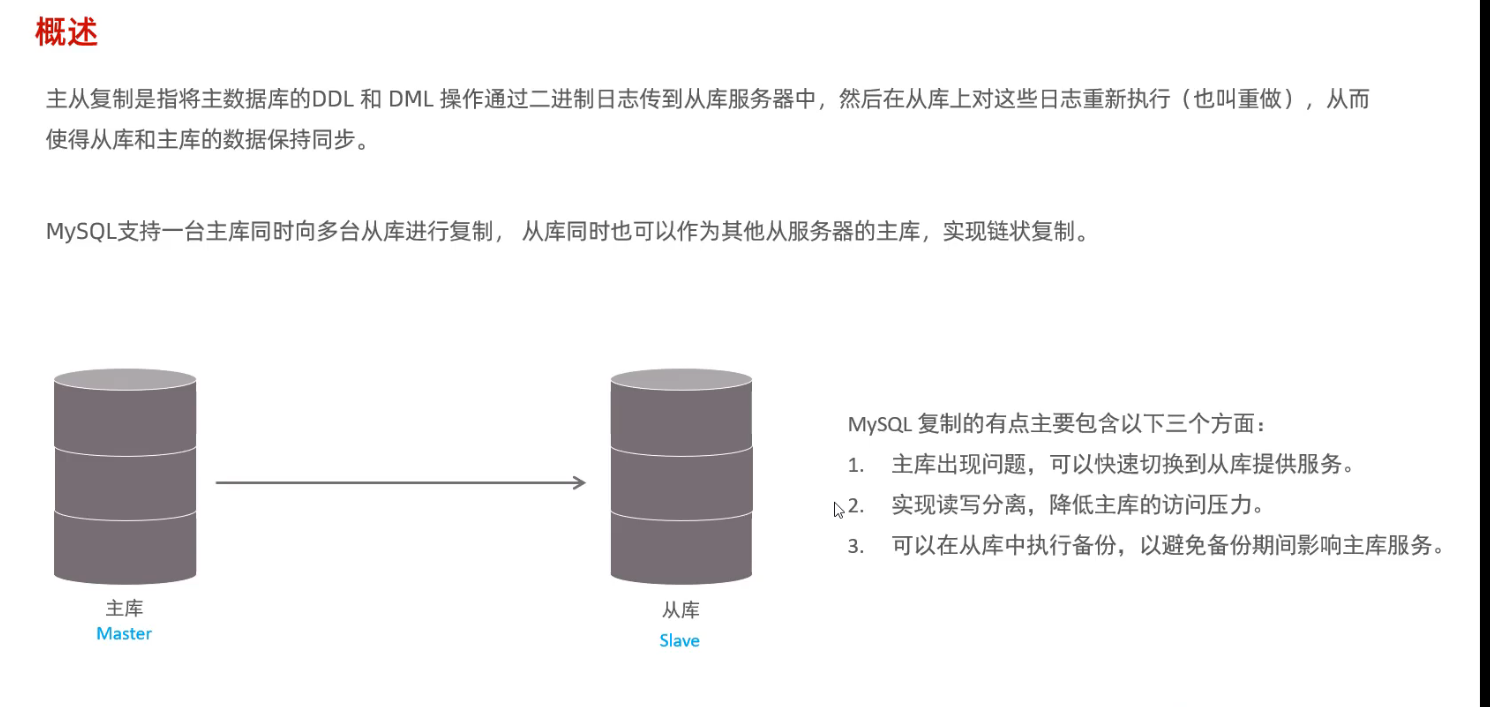
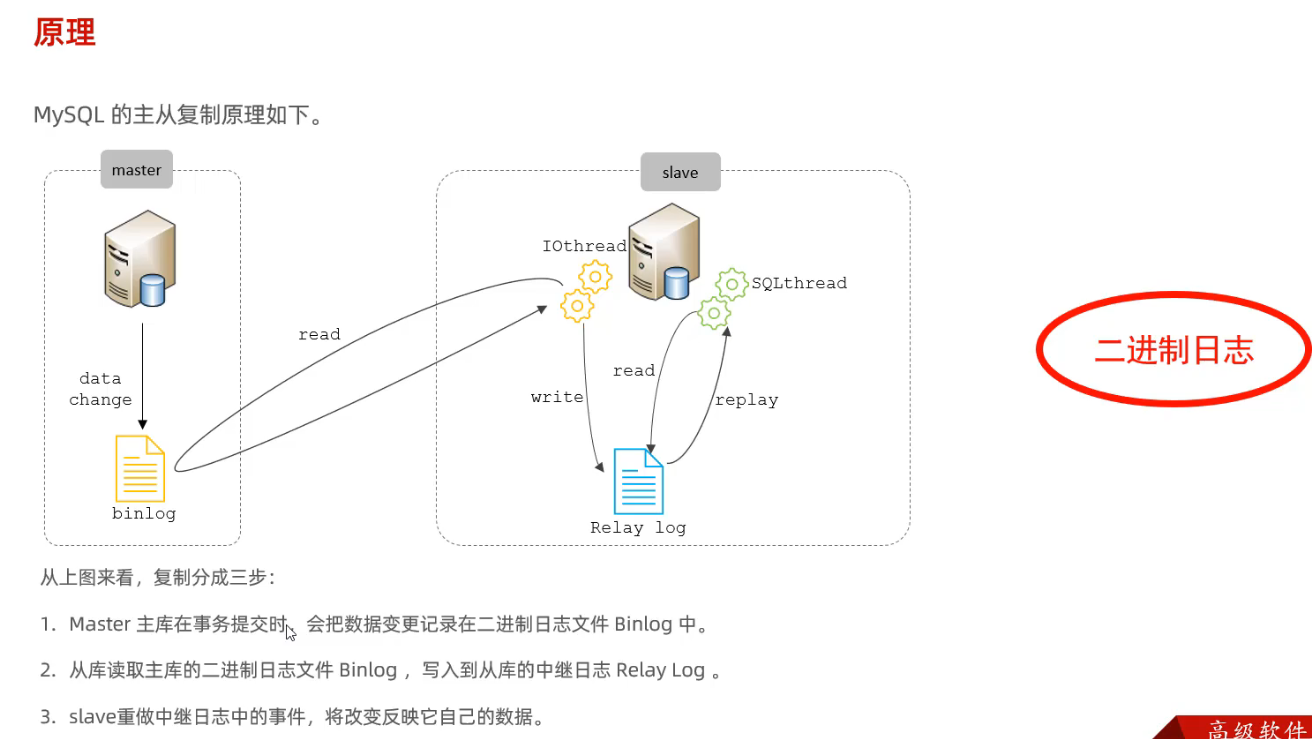
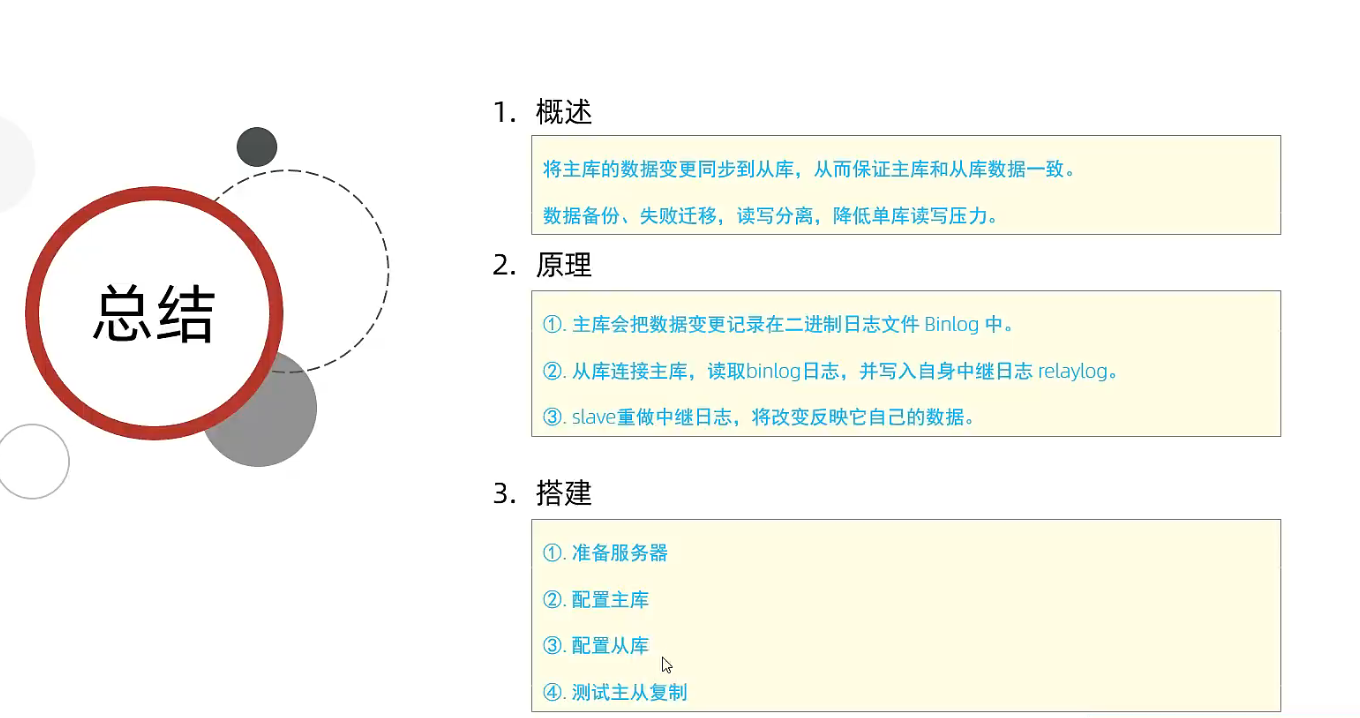
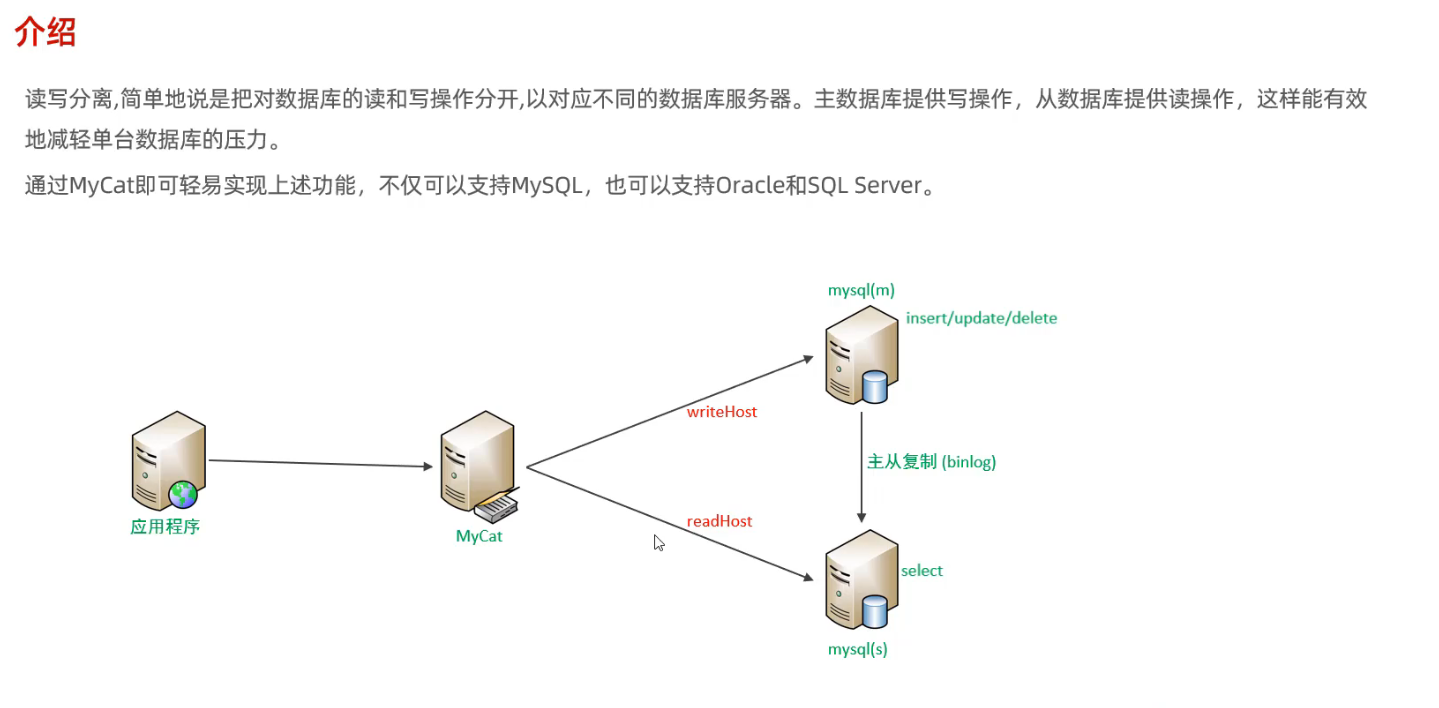
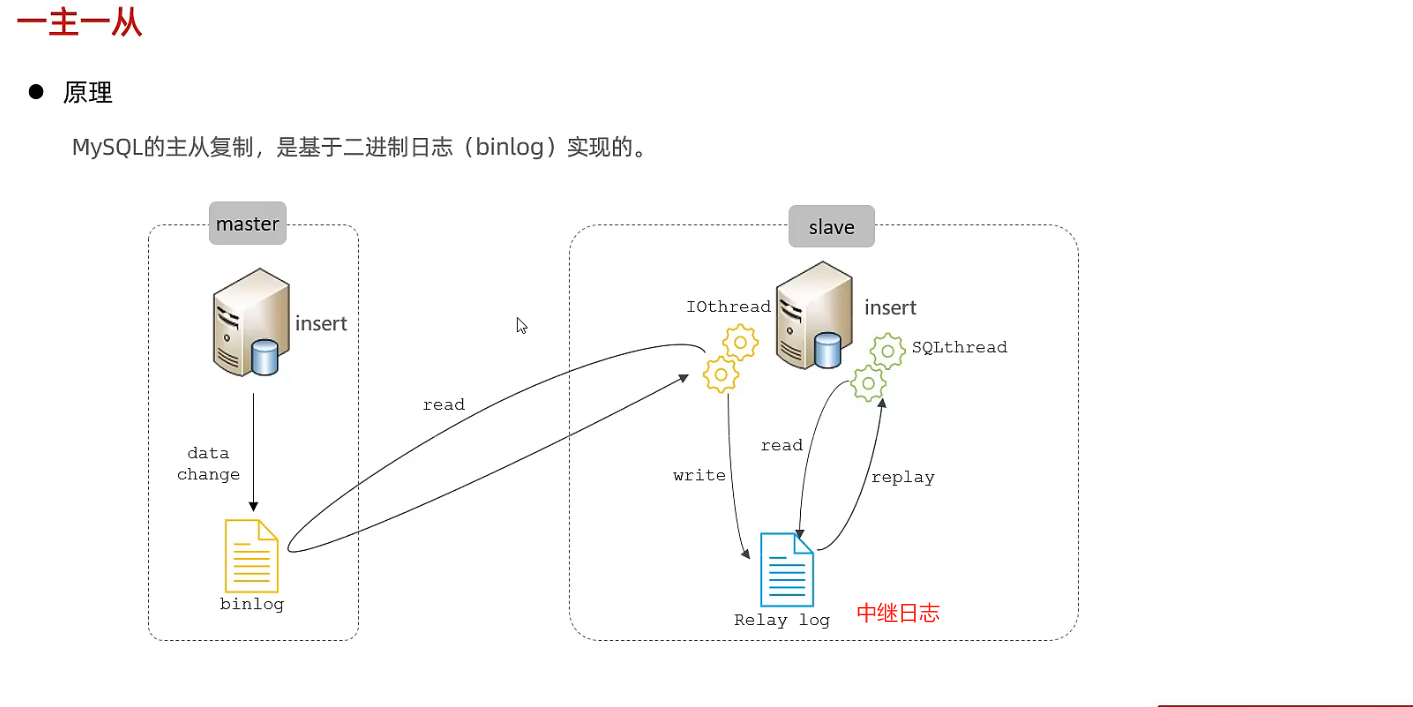
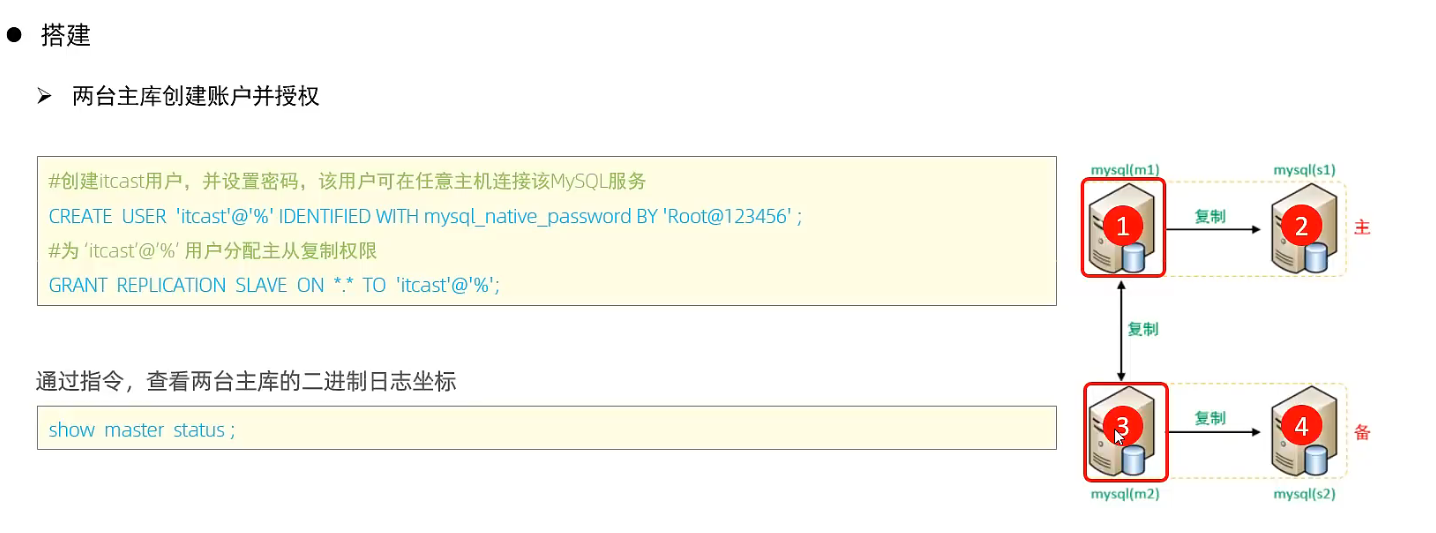
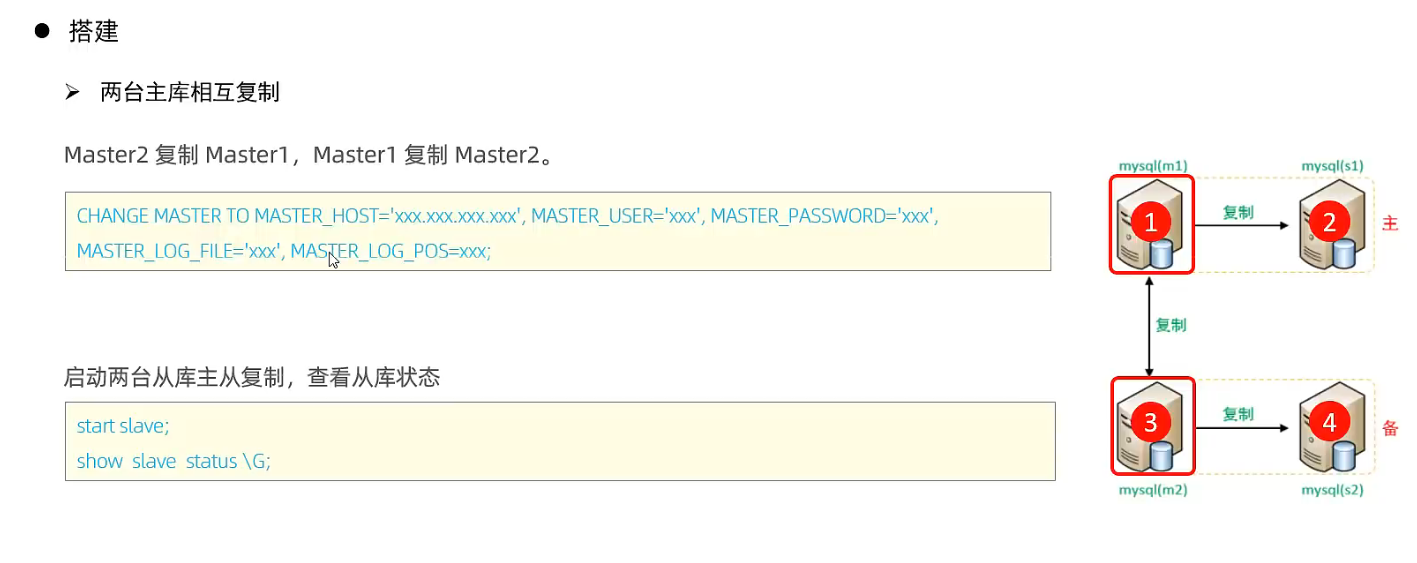
3 登录master, 创建远程连接的账号, 并授予主从复制权限
1
2
3
4
# 创建用户backup, 并设置密码, 该用户可在任意主机连接该mysql服务 CREATE USER 'backup'@'%' IDENTIFIED BY 'backup'; # 为backup用户分配主从复制权限 GRANT REPLICATION SLAVE ON *.* TO 'backup'@'%';
4 通过指令, 查看二进制日志坐标
1 2 3 4 5 6 7 8 9
show binary log status; # 不同版本此命令有区别

# mysql> show binary log status;
# +---------------+----------+--------------+------------------+-------------------+
# | File          | Position | Binlog_Do_DB | Binlog_Ignore_DB | Executed_Gtid_Set |
# +---------------+----------+--------------+------------------+-------------------+
# | binlog.000003 |      686 |              |                  |                   |
# +---------------+----------+--------------+------------------+-------------------+
# 1 row in set (0.00 sec)
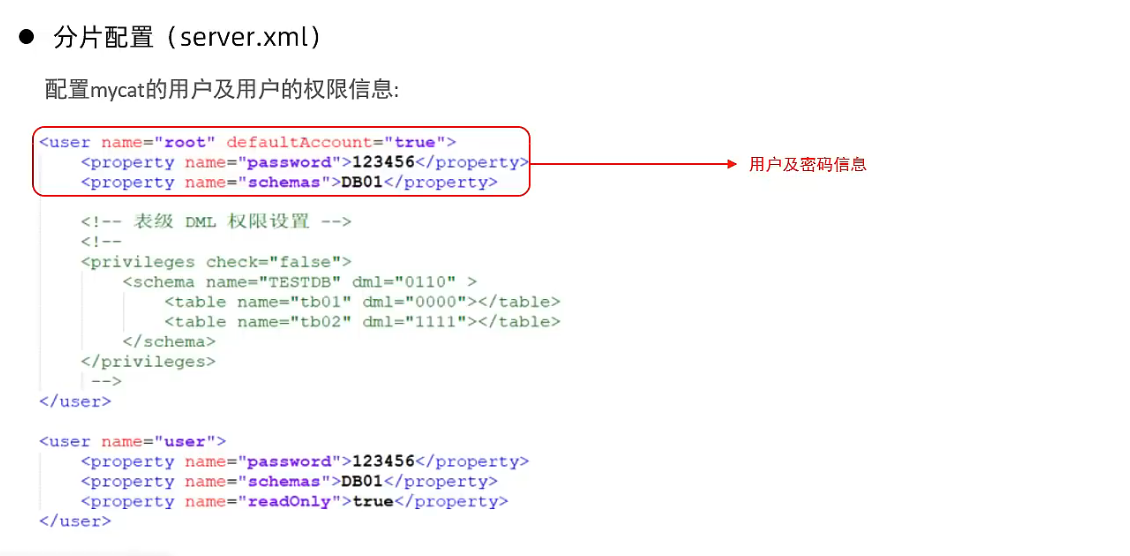
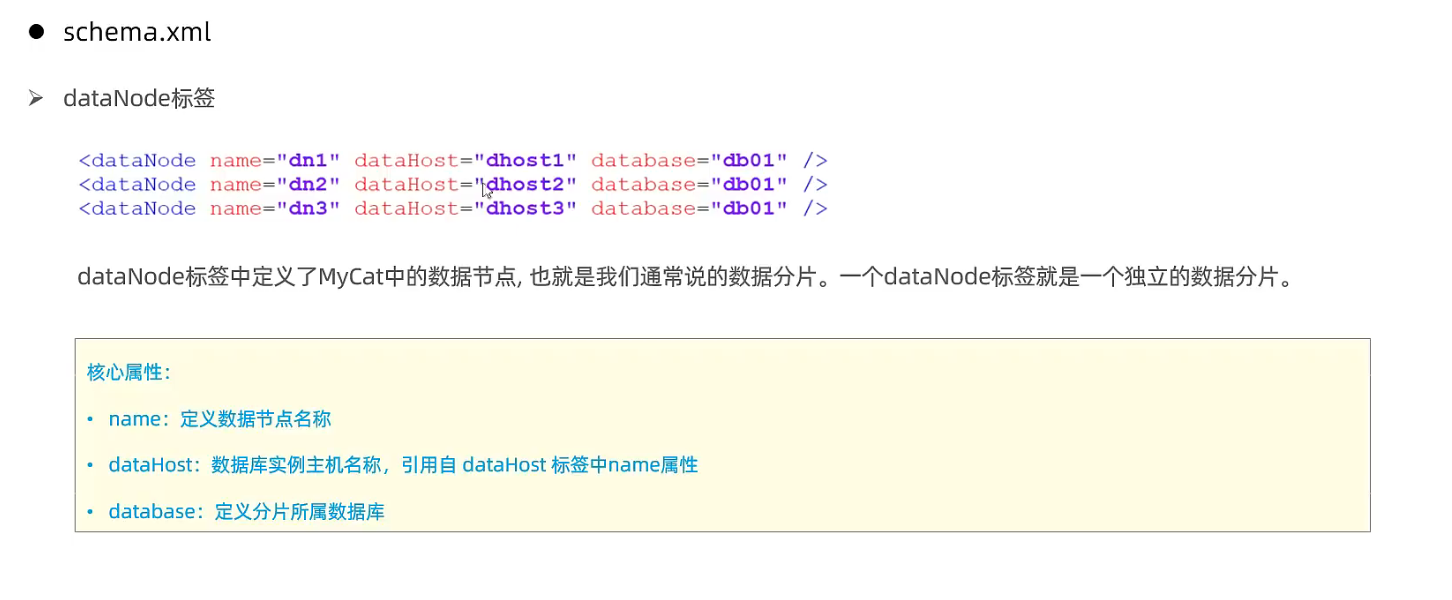
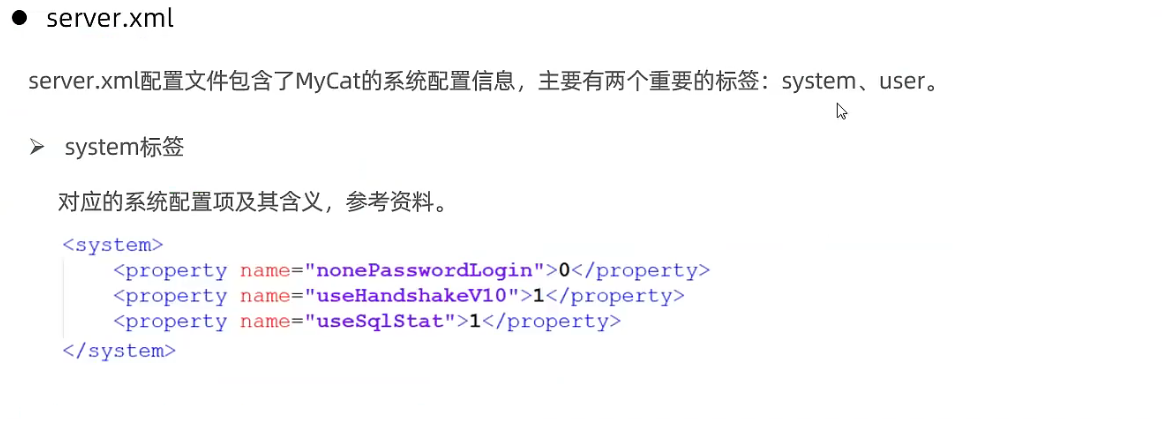
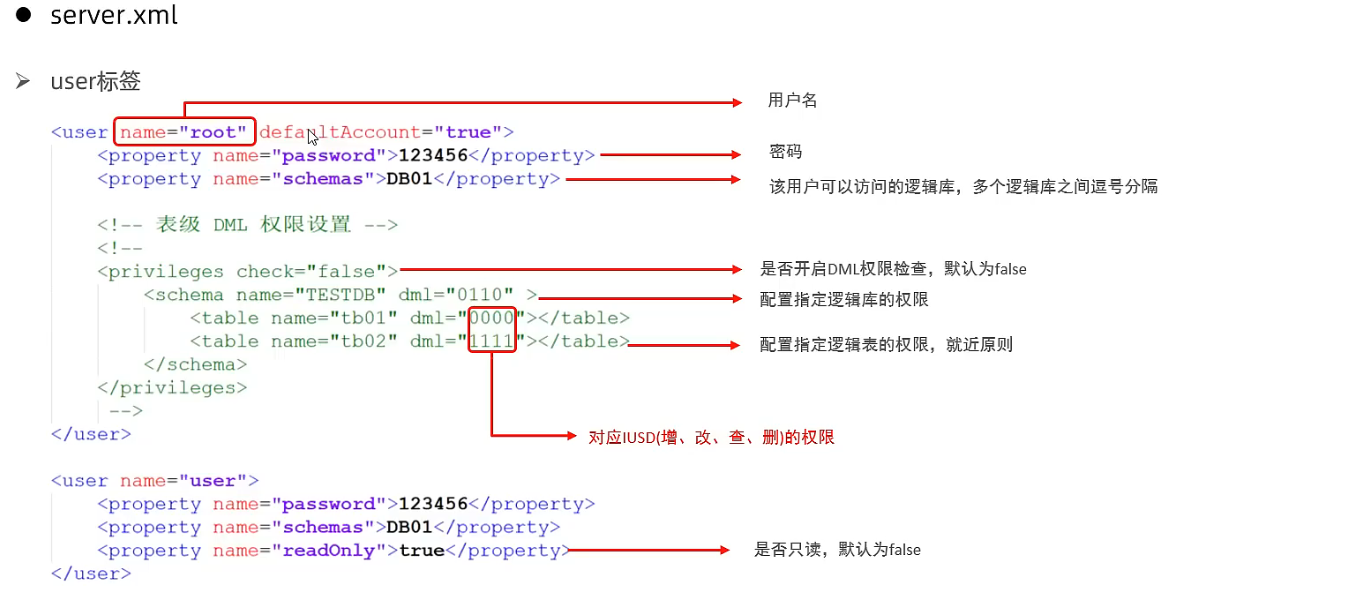
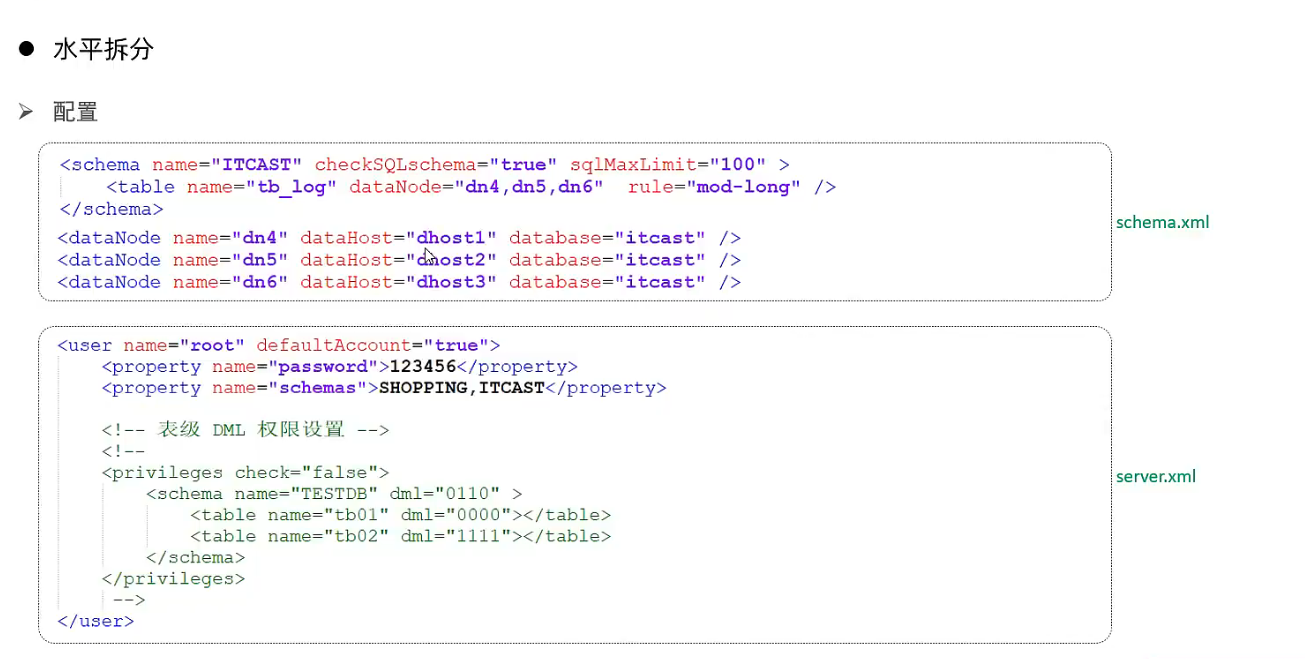
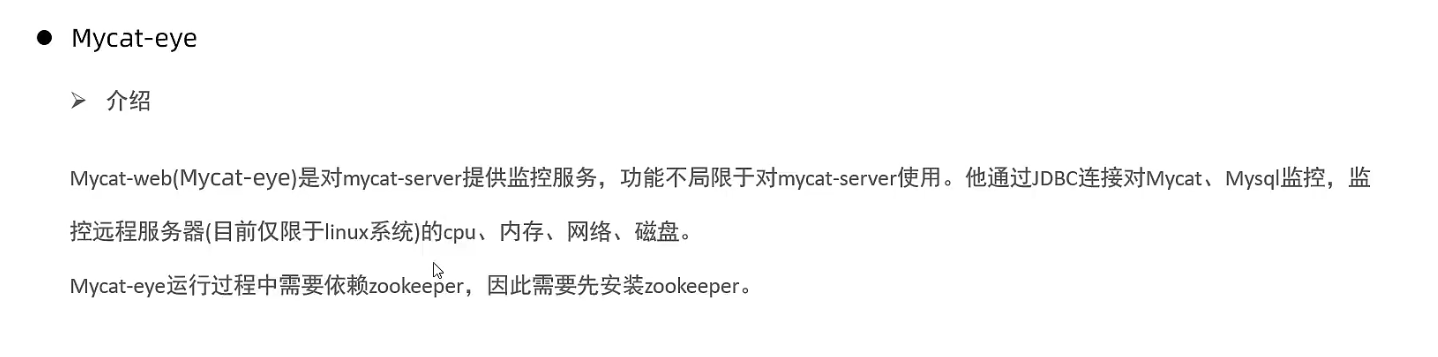
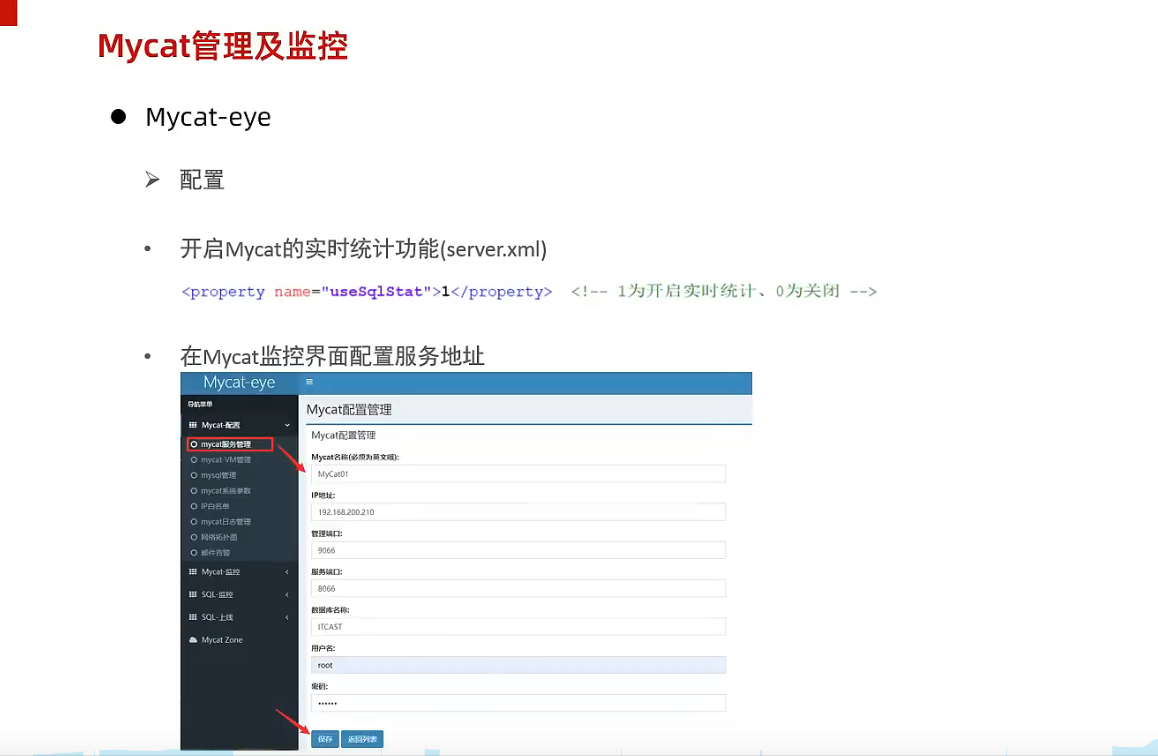
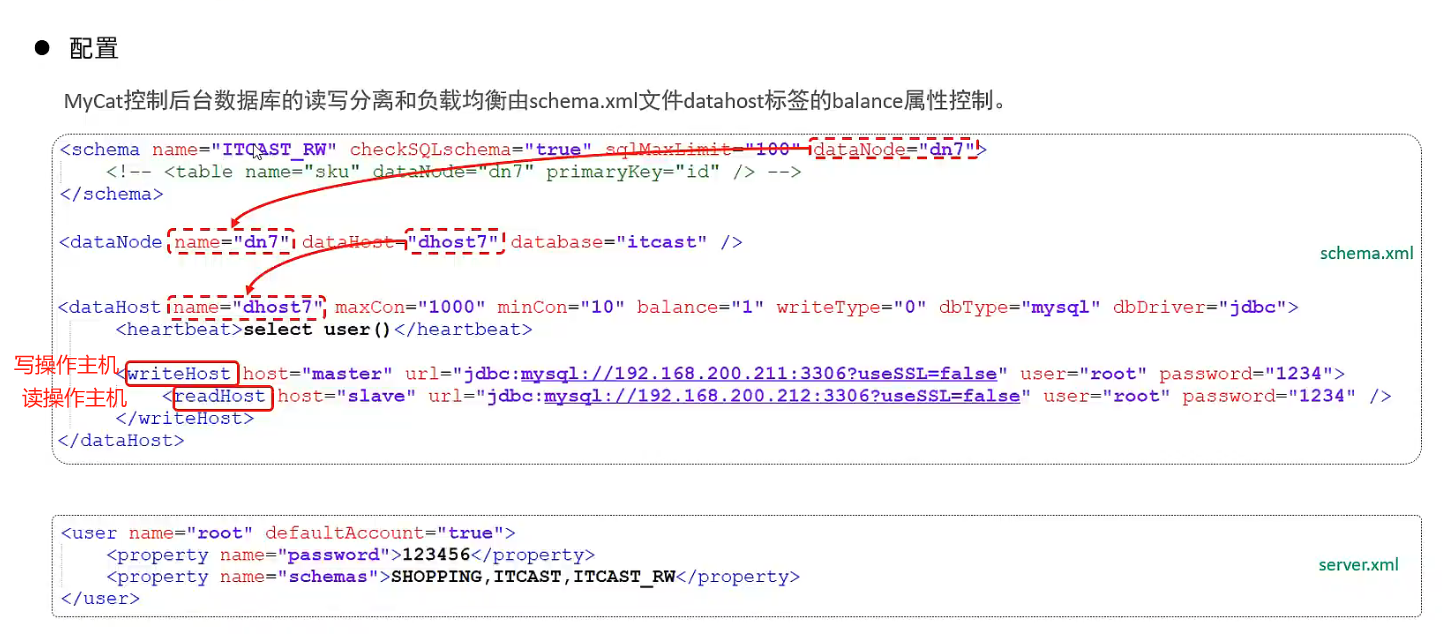
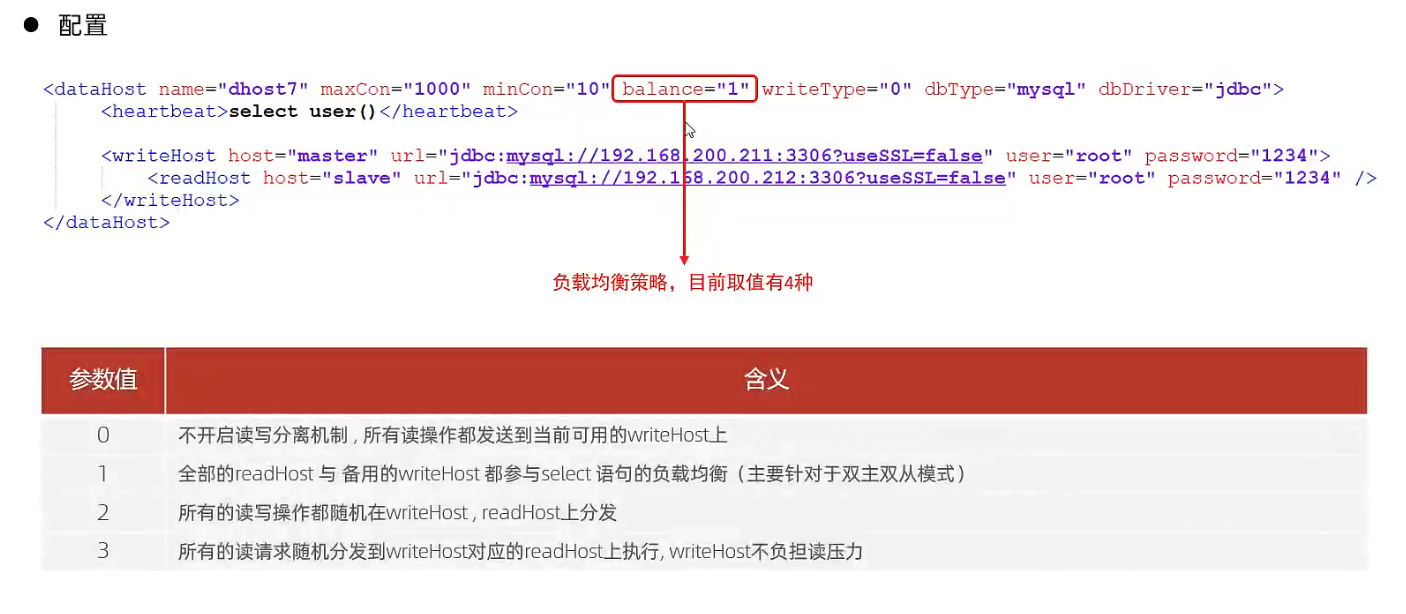
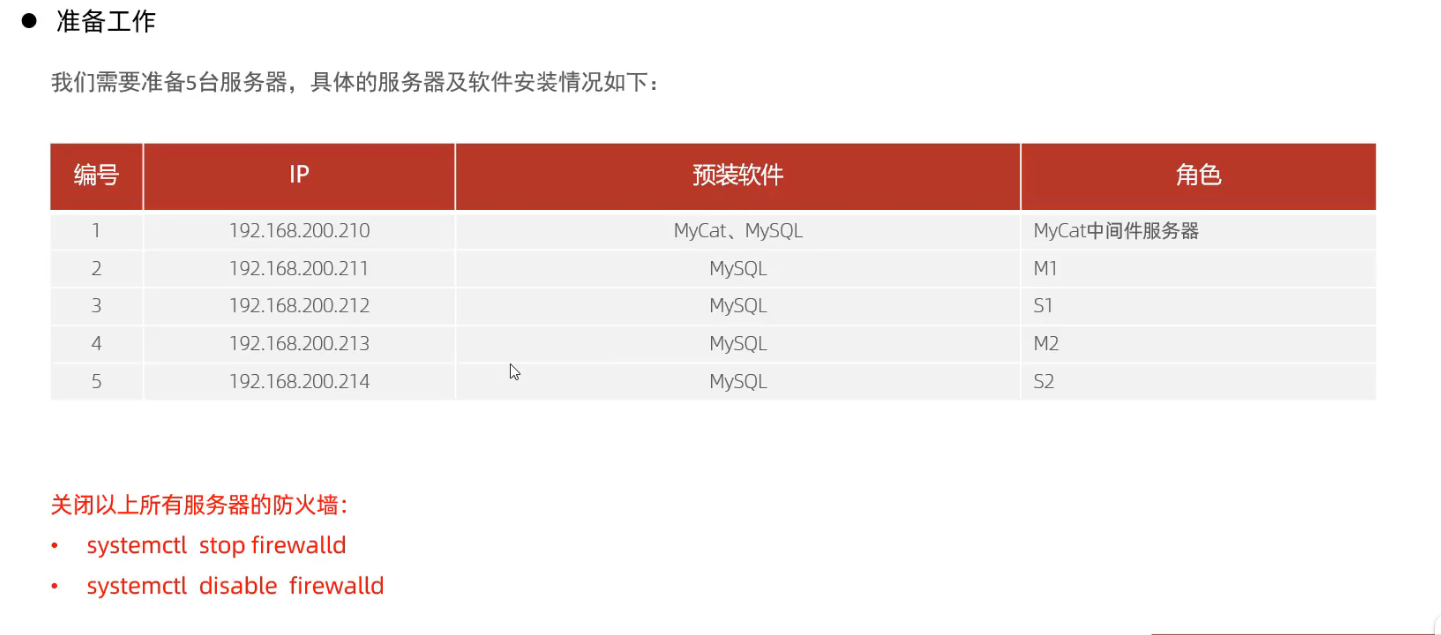
<?xml version="1.0" encoding="UTF-8"?> <!-- - - Licensed under the Apache License, Version 2.0 (the "License"); - you may not use this file except in compliance with the License. - You may obtain a copy of the License at - - http://www.apache.org/licenses/LICENSE-2.0 - - Unless required by applicable law or agreed to in writing, software - distributed under the License is distributed on an "AS IS" BASIS, - WITHOUT WARRANTIES OR CONDITIONS OF ANY KIND, either express or implied. - See the License for the specific language governing permissions and - limitations under the License. --> <!DOCTYPE mycat:server SYSTEM"server.dtd"> <mycat:serverxmlns:mycat="http://io.mycat/"> <system> <propertyname="nonePasswordLogin">0</property><!-- 0为需要密码登陆、1为不需要密码登陆 ,默认为0,设置为1则需要指定默认账户--> <propertyname="ignoreUnknownCommand">0</property><!-- 0遇上没有实现的报文(Unknown command:),就会报错、1为忽略该报文,返回ok报文。 在某些mysql客户端存在客户端已经登录的时候还会继续发送登录报文,mycat会报错,该设置可以绕过这个错误--> <propertyname="useHandshakeV10">1</property> <propertyname="removeGraveAccent">1</property> <propertyname="useSqlStat">0</property><!-- 1为开启实时统计、0为关闭 --> <propertyname="useGlobleTableCheck">0</property><!-- 1为开启全加班一致性检测、0为关闭 --> <propertyname="sqlExecuteTimeout">300</property><!-- SQL 执行超时 单位:秒--> <propertyname="sequnceHandlerType">1</property> <!--<property name="sequnceHandlerPattern">(?:(\s*next\s+value\s+for\s*MYCATSEQ_(\w+))(,|\)|\s)*)+</property> INSERT INTO `travelrecord` (`id`,user_id) VALUES ('next value for MYCATSEQ_GLOBAL',"xxx"); --> <!--必须带有MYCATSEQ_或者 mycatseq_进入序列匹配流程 注意MYCATSEQ_有空格的情况--> <propertyname="sequnceHandlerPattern">(?:(\s*next\s+value\s+for\s*MYCATSEQ_(\w+))(,|\)|\s)*)+</property> <propertyname="subqueryRelationshipCheck">false</property><!-- 子查询中存在关联查询的情况下,检查关联字段中是否有分片字段 .默认 false --> <propertyname="sequenceHanlderClass">io.mycat.route.sequence.handler.HttpIncrSequenceHandler</property> <!-- <property name="useCompression">1</property>--><!--1为开启mysql压缩协议--> <!-- <property name="fakeMySQLVersion">5.6.20</property>--><!--设置模拟的MySQL版本号--> <!-- <property name="processorBufferChunk">40960</property> --> <!-- <property name="processors">1</property> <property name="processorExecutor">32</property> --> <!--默认为type 0: DirectByteBufferPool | type 1 ByteBufferArena | type 2 NettyBufferPool --> <propertyname="processorBufferPoolType">0</property> <!--默认是65535 64K 用于sql解析时最大文本长度 --> <!--<property name="maxStringLiteralLength">65535</property>--> <!--<property name="sequnceHandlerType">0</property>--> <!--<property name="backSocketNoDelay">1</property>--> <!--<property name="frontSocketNoDelay">1</property>--> <!--<property name="processorExecutor">16</property>--> <!-- <property name="serverPort">8066</property> <property name="managerPort">9066</property> <property name="idleTimeout">300000</property> <property name="bindIp">0.0.0.0</property> <property name="dataNodeIdleCheckPeriod">300000</property> 5 * 60 * 1000L; //连接空闲检查 <property name="frontWriteQueueSize">4096</property> <property name="processors">32</property> --> <!--分布式事务开关,0为不过滤分布式事务,1为过滤分布式事务(如果分布式事务内只涉及全局表,则不过滤),2为不过滤分布式事务,但是记录分布式事务日志--> <propertyname="handleDistributedTransactions">0</property> <!-- off heap for merge/order/group/limit 1开启 0关闭 --> <propertyname="useOffHeapForMerge">0</property>
USE DB01;
show tables;
create table TB_ORDER(
id int not null auto increment primary key,
name varchar(255));
USE DB01;
show tables;
create table TB_ORDER2(
id int not null auto increment primary key,
name varchar(255));