AI-LangChain4j 学习笔记

1. 认识AI

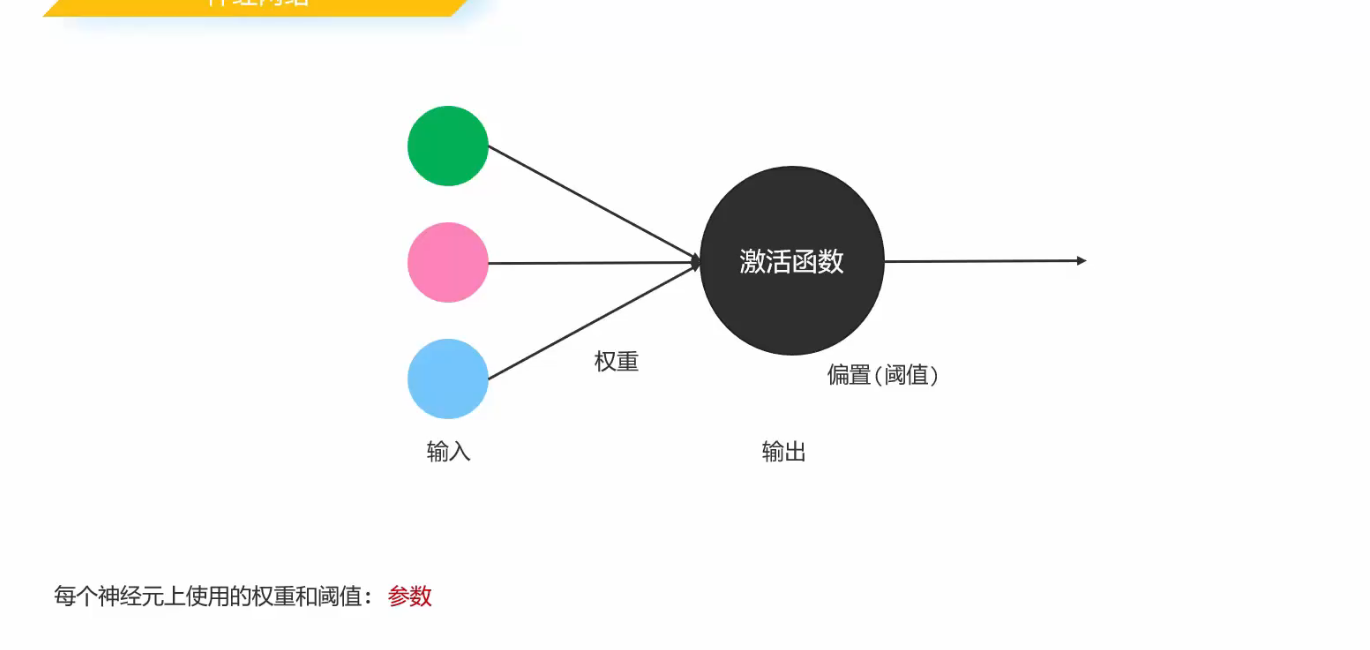
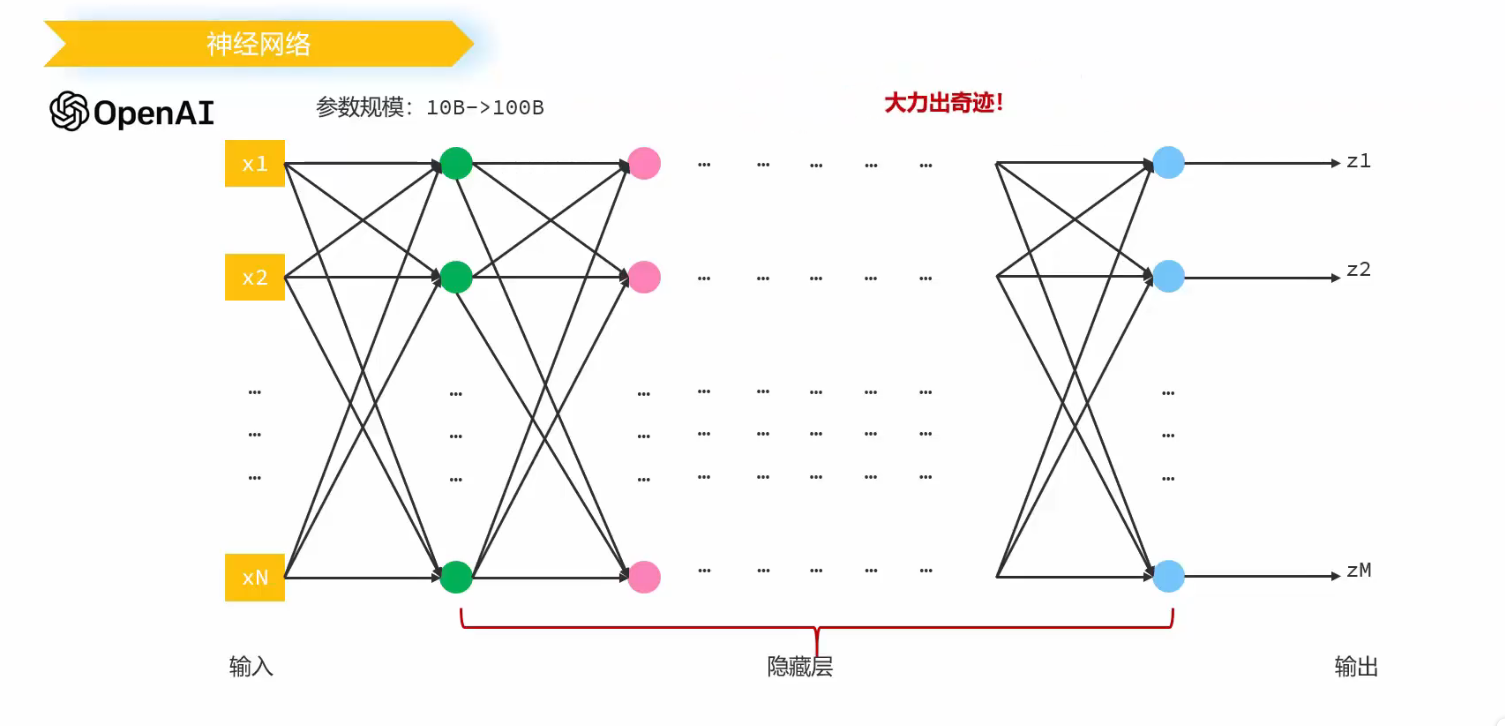
1.1 神经元

介绍

LangChain4j入门到实战项目: 项目地址

软件架构

前端:

  • 静态页面

后端框架:

  • Springboot

  • Langchain4j + Ollama

持久化:

  • 本地文件存储对话记录 (resources/memory)
  • 用户预约信息存储在内存(map结构)
  • RAG向量存储在内存

1. 快速入门:Ollama本地部署大模型

  • 安装ollama

下载地址:Ollama

  • 运行阿里千问小小模型
1
ollama run qwen3:0.6b
  • POST请求ollama本地服务

参考Thinking · Ollama Blog

1
2
3
4
5
6
7
8
9
10
11
12
13
14
15
16
17
18
19
20
//http://localhost:11434/api/chat
{
"model":"qwen3:0.6b",
"messages":[
{
"role":"system",
"content": "你是一个ai助手"
},
{
"role": "user",
"content": "叫什么名字?什么是PEFT?"
},
{
"role":"assistant",
"content" : "我是小小傻瓜蛋"
}
],
"think":true,
"stream":false
}

2. 整合spring-boot

2.1 引入ollama依赖

1
2
3
4
5
6
<dependency>
<groupId>dev.langchain4j</groupId>
<artifactId>langchain4j-ollama</artifactId>
<version>1.0.1-beta6</version>
</dependency>

2.2 配置模型

1
2
3
4
5
6
7
8
9
10
11
12
13
//Properties
package com.learning.langchain4j.config;

import lombok.Data;
import org.springframework.boot.context.properties.ConfigurationProperties;

@ConfigurationProperties(prefix = "ollama")
@Data
public class OllamaConfigProperties {
private String modelName;
private String baseUrl; // 本地 ollama 基础 URL
}

1
2
3
4
5
6
7
8
9
10
11
12
13
14
15
16
17
18
19
20
21
22
23
24
25
26
27
28
29
30
31
32
33
//Ollama 配置
package com.learning.langchain4j.config;

import dev.langchain4j.model.ollama.OllamaChatModel;
import org.springframework.boot.context.properties.ConfigurationProperties;
import org.springframework.boot.context.properties.EnableConfigurationProperties;
import org.springframework.context.annotation.Bean;
import org.springframework.context.annotation.Configuration;

import java.time.Duration;

@Configuration
@EnableConfigurationProperties(OllamaConfigProperties.class)
public class OllamaConfig {


@Bean
public OllamaChatModel ollamaChatModel(OllamaConfigProperties ollamaConfigProperties){
OllamaChatModel model = OllamaChatModel.builder()
.modelName(ollamaConfigProperties.getModelName())
.baseUrl(ollamaConfigProperties.getBaseUrl())
.timeout(Duration.ofSeconds(30)) // 超时时间
.logRequests(true)
.logResponses(true)
.maxRetries(3) // 超时最大重试次数
.build();
return model;
}


}

1
2
3
4
5
6
7
8
9
# yaml
server:
port: 8099
spring:
application:
name: ai-consultant
ollama:
base-url: http://localhost:11434
model-name: qwen3:0.6b

2.3 编写controller

1
2
3
4
5
6
7
8
9
10
11
12
13
14
15
16
17
18
19
20
21
22
23
package com.learning.langchain4j;

import dev.langchain4j.model.ollama.OllamaChatModel;
import lombok.extern.slf4j.Slf4j;
import org.springframework.beans.factory.annotation.Autowired;
import org.springframework.web.bind.annotation.GetMapping;
import org.springframework.web.bind.annotation.RequestMapping;
import org.springframework.web.bind.annotation.RestController;

@RestController
@Slf4j
public class ChatController {

@Autowired
private OllamaChatModel ollamaChatModel;

@RequestMapping("/chat")
public String chat(String message) {
log.info("用户: {}", message);
return ollamaChatModel.generate(message);
}
}

2.4 测试

1
http://localhost:8099/chat?message="你好"

3. 功能会话 AIServices

3. 1 引入依赖

1
2
3
4
5
<dependency>
<groupId>dev.langchain4j</groupId>
<artifactId>langchain4j-spring-boot-starter</artifactId>
<version>1.0.1-beta6</version>
</dependency>

3.2 Service 和Controller

1
2
3
4
5
6
7
8
9
10
11
12
13
14
15
16
17
18
19
20
// AiService
@AiService(
chatModel = "ollamaChatModel",
wiringMode = AiServiceWiringMode.EXPLICIT
)
public interface ConsultantService {
// 用于聊天的方法,message为用户输入内容
String chat(String message);
}


// Controller
@Autowired
private ConsultantService consultantService;

@RequestMapping("/streamChat")
public String streamChat(String message) {
log.info("用户: {}", message);
return consultantService.chat(message);
}

4. 流式调用

4.1 依赖

1
2
3
4
5
6
7
8
9
10

<dependency>
<groupId>org.springframework.boot</groupId>
<artifactId>spring-boot-starter-webflux</artifactId>
</dependency>
<dependency>
<groupId>dev.langchain4j</groupId>
<artifactId>langchain4j-reactor</artifactId>
<version>1.0.1-beta6</version>
</dependency>

4.2 Config, Service, Controller

  • config
1
2
3
4
5
6
7
8
9
10
@Bean
public OllamaStreamingChatModel ollamaStreamingChatModel(OllamaConfigProperties ollamaConfigProperties){
return OllamaStreamingChatModel.builder()
.modelName(ollamaConfigProperties.getModelName())
.baseUrl(ollamaConfigProperties.getBaseUrl())
.timeout(Duration.ofSeconds(ollamaConfigProperties.getTimeOut())) // 超时时间
.logRequests(ollamaConfigProperties.getLogRequests())
.logResponses(ollamaConfigProperties.getLogResponses())
.build();
}
  • service
1
2
3
4
5
6
7
8
9
10
@AiService(
chatModel = "ollamaChatModel",
wiringMode = AiServiceWiringMode.EXPLICIT,
streamingChatModel = "ollamaStreamingChatModel"
)
public interface ConsultantService {
// 用于聊天的方法,message为用户输入内容
Flux<String> chat(String message);
}

  • controller
1
2
3
4
5
6
7
8
@Autowired
private ConsultantService consultantService;

@RequestMapping(value = "/streamChat", produces = "text/html;charset=utf-8") // produces指定响应类型,解决响应乱码问题
public Flux<String> streamChat(String message) {
log.info("用户: {}", message);
return consultantService.chat(message);
}

5 消息会话

5.1 message注解

1
2
3
4
5
6
7
8
9
10
@AiService(
chatModel = "ollamaChatModel",
wiringMode = AiServiceWiringMode.EXPLICIT,
streamingChatModel = "ollamaStreamingChatModel"
)
public interface ConsultantService {
// 用于聊天的方法,message为用户输入内容
@SystemMessage(fromResource = "system.txt")
Flux<String> chat(String message);
}

5.2 会话记忆

  • config
1
2
3
4
5
6
7
@Bean
public ChatMemory chatMemory(OllamaConfigProperties ollamaConfigProperties){
return MessageWindowChatMemory.builder()
.maxMessages(ollamaConfigProperties.getMaxMessages())
.build();

}
  • service
1
2
3
4
5
6
7
8
9
10
11
12
@AiService(
chatModel = "ollamaChatModel",
wiringMode = AiServiceWiringMode.EXPLICIT,
streamingChatModel = "ollamaStreamingChatModel",
chatMemory = "chatMemory"
)
public interface ConsultantService {
// 用于聊天的方法,message为用户输入内容
@SystemMessage(fromResource = "system.txt")

Flux<String> chat(String message);
}

5.3 会话记忆隔离

  • config
1
2
3
4
5
6
7
8
9
10
11
12
@Bean
public ChatMemoryProvider chatMemoryProvider(OllamaConfigProperties ollamaConfigProperties){
return new ChatMemoryProvider(){
@Override
public ChatMemory get(Object o) {
return MessageWindowChatMemory.builder()
.id(o)
.maxMessages(ollamaConfigProperties.getMaxMessages())
.build();
}
};
}
  • service
1
2
3
4
5
6
7
8
9
10
11
12
@AiService(
chatModel = "ollamaChatModel",
wiringMode = AiServiceWiringMode.EXPLICIT,
streamingChatModel = "ollamaStreamingChatModel",
chatMemoryProvider = "chatMemoryProvider"
)
public interface ConsultantService {
// 用于聊天的方法,message为用户输入内容
@SystemMessage(fromResource = "system.txt")
Flux<String> chat(@MemoryId String memoryId, @UserMessage String message);
}

  • controller
1
2
3
4
5
@RequestMapping(value = "/streamChat", produces = "text/html;charset=utf-8")
public Flux<String> streamChat(String memoryId,String message) {
log.info("用户: {}", message);
return consultantService.chat(memoryId,message);
}

5.4 数据持久化- 本地文件

  • repository
1
2
3
4
5
6
7
8
9
10
11
12
13
14
15
16
17
18
19
20
21
22
23
24
25
26
27
28
29
30
31
32
33
34
35
36
37
38
39
40
41
42
43
44
45
46
47
48
49
50
51
52
53
54
55
56
57
58
59
60
61
62
63
64
65
66
67
68
69
70
71
72
73
74
75
76
77
78
79
80
81
82
83
84
package com.learning.langchain4j.repository;


import dev.langchain4j.data.message.ChatMessage;
import dev.langchain4j.data.message.ChatMessageDeserializer;
import dev.langchain4j.data.message.ChatMessageSerializer;
import dev.langchain4j.store.memory.chat.ChatMemoryStore;
import org.springframework.stereotype.Repository;

import java.io.*;
import java.nio.file.Path;
import java.nio.file.Paths;
import java.util.HashMap;
import java.util.List;
import java.util.Map;

@Repository
public class MyChatMemoryStore implements ChatMemoryStore {
// 存储路径:优先使用resource目录下的memory文件
private static final Path STORAGE_PATH = Paths.get("src/main/resources/memory");
private final Map<Object, String> memoryMap = new HashMap<>();

public MyChatMemoryStore() {
loadFromFile(); // 初始化时加载持久化数据
}

// 从文件加载会话记忆
private synchronized void loadFromFile() {
try (ObjectInputStream ois = new ObjectInputStream(
new FileInputStream(STORAGE_PATH.toFile()))) {
Map<Object, String> loadedMap = (Map<Object, String>) ois.readObject();
memoryMap.putAll(loadedMap);
} catch (FileNotFoundException e) {
initStorageFile(); // 首次使用时创建文件
} catch (IOException | ClassNotFoundException e) {
throw new RuntimeException("Failed to load chat memory", e);
}
}

// 初始化存储文件
private void initStorageFile() {
try {
File file = STORAGE_PATH.toFile();
if (!file.getParentFile().exists()) {
file.getParentFile().mkdirs();
}
file.createNewFile();
saveToFile(); // 创建空文件
} catch (IOException e) {
throw new RuntimeException("Failed to initialize storage file", e);
}
}

// 保存会话记忆到文件
private synchronized void saveToFile() {
try (ObjectOutputStream oos = new ObjectOutputStream(
new FileOutputStream(STORAGE_PATH.toFile()))) {
oos.writeObject(memoryMap);
} catch (IOException e) {
throw new RuntimeException("Failed to save chat memory", e);
}
}

@Override
public List<ChatMessage> getMessages(Object memoryId) {
String s = memoryMap.get(memoryId);
List<ChatMessage> list = ChatMessageDeserializer.messagesFromJson(s);

return list;
}

@Override
public void updateMessages(Object memoryId, List<ChatMessage> messages) {
String s = ChatMessageSerializer.messagesToJson(messages);
memoryMap.put(memoryId, s);
saveToFile(); // 更新后立即持久化
}

@Override
public void deleteMessages(Object memoryId) {
memoryMap.remove(memoryId);
saveToFile(); // 删除后立即持久化
}
}
  • config
1
2
3
4
5
6
7
8
9
10
11
12
13
@Bean
public ChatMemoryProvider chatMemoryProvider(OllamaConfigProperties ollamaConfigProperties,ChatMemoryStore myChatMemoryStore){
return new ChatMemoryProvider(){
@Override
public ChatMemory get(Object o) {
return MessageWindowChatMemory.builder()
.id(o)
.maxMessages(ollamaConfigProperties.getMaxMessages())
.chatMemoryStore(myChatMemoryStore)
.build();
}
};
}

6. RAG知识库

6.1 原理

  1. 知识文本通过向量模型转为向量
  2. 将向量和文本一一存储到向量数据库
  3. 用户输入时,先计算用户提问的文本对应的向量,然后再到向量数据库中去匹配,计算用户输入向量与数据库中向量余弦相似度
  4. 设定余弦相似度阈值,例如0.5,那么余弦相似度大于0.5的数据就会被提取出来,和用户提问数据一并交给大模型处理

6.2 快速入门

  • 引入依赖
1
2
3
4
5
6
<!--RAG数据库相关依赖-->
<dependency>
<groupId>dev.langchain4j</groupId>
<artifactId>langchain4j-easy-rag</artifactId>
<version>1.0.1-beta6</version>
</dependency>
  • config
1
2
3
4
5
6
7
8
9
10
11
12
13
14
15
16
17
18
19
20
21
22
23
24
25
26
27
28
29
/**
* 加载文件进内存,当作RAG
* @return
*/
@Bean
public EmbeddingStore embeddingStore(){ // 出现重名需要重命名
// 1.加载文件进内存,构建向量数据库操作对象
List<Document> contents = ClassPathDocumentLoader.loadDocuments("content");
InMemoryEmbeddingStore store = new InMemoryEmbeddingStore(); // 使用内存当作向量数据库

// 文本切割,向量化
EmbeddingStoreIngestor ingestor = EmbeddingStoreIngestor.builder()
.embeddingStore(store)
.build();

IngestionResult ingest = ingestor.ingest(contents);
return store;
}


//构建向量数据库检索对象
@Bean
public ContentRetriever contentRetriever(EmbeddingStore embeddingStore){
return EmbeddingStoreContentRetriever.builder()
.embeddingStore(embeddingStore)
.minScore(0.5)
.maxResults(3)
.build();
}
  • service
1
2
3
4
5
6
7
8
9
10
11
12
13
@AiService(
chatModel = "ollamaChatModel",
wiringMode = AiServiceWiringMode.EXPLICIT,
streamingChatModel = "ollamaStreamingChatModel",
chatMemoryProvider = "chatMemoryProvider",
contentRetriever = "contentRetriever"
)
public interface ConsultantService {
// 用于聊天的方法,message为用户输入内容
@SystemMessage(fromResource = "system.txt")
Flux<String> chat(@MemoryId String memoryId, @UserMessage String message);
}

6.3 核心API

1 内容加载

  • FileSystemDocumentLoader
  • ClassPathDocumentLoader
  • UrlDocumentLoader

2 文本分割器

  • DocumentByParagraphSplitter 按照段落
  • DocumentByRegexSpliter 按照正则表达式分割
  • DocumentSplitters.recursive(…)(默认) 递归分割器,优先段落,再按照行,句子和词

3 配置自己想要的向量模型

具体操作:略,本项目采用内存向量数据库,理解即可

4 部署向量数据库

具体操作:略,本项目采用内存向量数据库,理解即可

常用向量数据库:

  • Milvus
  • Chroma
  • Pinecone
  • RedisSearch(Redis)
  • pgvector(PostgreSQL)

使用向量数据库流程

  1. 安装好向量数据库
  2. 引入maven依赖
  3. 配置向量数据库信息
  4. 注入向量数据库对象并引用

7. Tools

7.1 开发预约服务,可以读写mysql中预约表中的信息

具体操作:本项目采用Map作为数据库,理解即可

数据库准备:

  1. 准备数据库环境
  2. 引入依赖
  3. 配置连接信息
  4. 准备实体类
  5. 开发mapper
  6. 开发service
  7. 完成测试

7.2 原理

image-20250715183922428

7.3 实现

  1. 准备工具方法
  2. 配置工具方法

image-20250715184248004

  • tool配置
1
2
3
4
5
6
7
8
9
10
11
12
13
14
15
16
17
18
19
20
21
22
23
24
25
26
27
28
29
30
31
32
33
34
35
36
37
38
39
40
41
@Component
public class ReservationTool {

@Autowired
private ReservationService reservationService;


// 1. 工具:添加预约信息

@Tool("预约志愿填报服务")
public void addReservation(
@P("考生姓名") String name,
@P("考生性别") String gender,
@P("考生电话") String phone,
@P("会话时间") LocalDateTime communicationTime,
@P("考生所在省份") String province,
@P("考生预估分数") Integer estimateScore

) {
Reservation build = Reservation.builder()
.id(null)
.name(name)
.gender(gender)
.phone(phone)
.communicationTime(communicationTime)
.province(province)
.estimateScore(estimateScore)
.build();

reservationService.insert(build);

}


// 2. 工具: 查询预约信息

@Tool("根据用户手机号码查询预约单")
public Reservation findReservation(@P("考生电话") String phone){
return reservationService.findByPhone(phone);
}
}
  • service 使用
1
2
3
4
5
6
7
8
9
10
11
12
13
@AiService(
chatModel = "ollamaChatModel",
wiringMode = AiServiceWiringMode.EXPLICIT,
streamingChatModel = "ollamaStreamingChatModel",
chatMemoryProvider = "chatMemoryProvider",
contentRetriever = "contentRetriever",
tools = {"reservationTool"}
)
public interface ConsultantService {
// 用于聊天的方法,message为用户输入内容
@SystemMessage(fromResource = "system.txt")
Flux<String> chat(@MemoryId String memoryId, @UserMessage String message);
}

qwen3:0.6b似乎不能完成工具的调用