规则引擎 Drools 1. 简介 业务规则引擎,业务规则管理系统, BRMS。
规则引擎的主要思想是将应用程序中的业务决策部分分离出来,并使用预定义的语义模块编写业务决策(业务规则),由用户或者开发者在需要时进行配置管理。
规则引擎并不是一个具体的技术框架,而是指一类系统,即业务规则管理系统。市面上常见产品有drools,VisualRules,iLog等
规则引擎实现了将业务规则从程序代码中分离出来,接收数据输入,解释业务规则,并根据业务规则做出业务决策。
1.1 优点
业务规则和系统代码解耦,实现业务规则的集中管理
在不重启服务的情况下,可随时对业务规则进行扩展和维护(热更新)
可以动态修改业务规则,从而快速响应业务方的需求变更,大大提高了生产效率。
1.2 应用场景
风控系统:风险贷款、风险评估
反欺诈项目:银行贷款、征信验证
决策平台:财务计算
促销平台:满减、打折
1.3 快速案例
1 2 3 4 5 6 7 8 9 10 11 12 <dependency > <groupId > org.drools</groupId > <artifactId > drools-compiler</artifactId > <version > 7.50.0.Final</version > </dependency > <dependency > <groupId > org.drools</groupId > <artifactId > drools-mvel</artifactId > <version > 7.50.0.Final</version > </dependency >
1
2
3
4
5
6
7
8
9
10
package com.learning.drools.entity;import lombok.Data;@Data public class Order { private Double originalPrice; private Double realPrice; }
在resources/META-INF文件夹下创建kmodule.xml文件
1
2
3
4
5
6
7
8
9
<?xml version="1.0" encoding="UTF-8" ?> <kmodule xmlns ="http://www.drools.org/xsd/kmodule" > <kbase name ="myKbase1" packages ="rules" default ="true" > <ksession name ="ksession-rule" default ="true" /> </kbase > </kmodule >
在resource下的rules文件夹下定义discountRules.drl文件
1
2
3
4
5
6
7
8
9
10
11
12
13
14
15
16
17
18
19
20
21
22
23
24
25
26
27
28
29
30
31
32
33
34
35
36
37
38
39
40
41
package rules import com.learning.drools.entity.Order // 引入entity // 第一条规则: 所购图书少于100元,没有优惠 rule "rule_discount_1" when $order:Order(originalPrice < 100) // 模式匹配,到规则引擎中(工作内存)查找Order对象,查找originalPrice < 100 的对象; $order是对这个对象的别名 then $order.setRealPrice($order.getOriginalPrice()); System.out.println("规则1:没有优惠"); end // 规则二: 价格在100 - 200 优惠20元 rule "rule_discount_2" when $order:Order(originalPrice >=100 && originalPrice < 200) then $order.setRealPrice($order.getOriginalPrice() - 20); System.out.println("规则2:价格在100 - 200, 优惠20元"); end // 规则三: 价格在200 - 300 优惠50元 rule "rule_discount_3" when $order:Order(originalPrice >=200 && originalPrice < 300) then $order.setRealPrice($order.getOriginalPrice() - 50); System.out.println("规则三:价格在200 - 300, 优惠50元"); end // 规则四: 价格在300 以上优惠100元 rule "rule_discount_4" when $order:Order(originalPrice >= 300) then $order.setRealPrice($order.getOriginalPrice() - 100); System.out.println("规则四: 价格在300以上, 优惠100元"); end
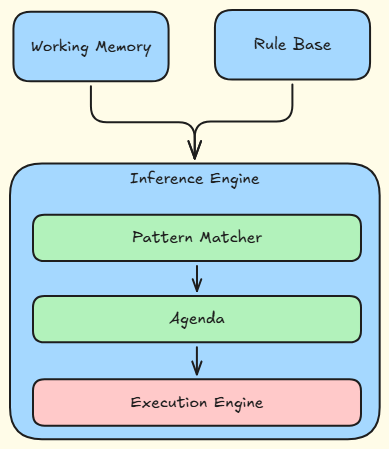
1.4 规则引擎的构成
Working Memory(工作内存)
Rule Base(规则库)
Inference Engine(推理引擎)
Pattern Matcher(匹配器) // 匹配符合条件的规则,将其加入到议程中
Agenda(议程) // 即将执行的规则就在议程中
Execution Engine(执行引擎)
1.5 规则引擎相关概念说明
1.5.1 Working memory 工作内存: drools会从工作内存中获取数据并和规则文件中定义的规则进行模式匹配,所以我们开发的应用程序只需要将我们的数据插入到working Memory中即可。 例如kiesession.insert(order)
1.5.2 Fact 事实: 是指在drools规则应用中,将一个普通的Java Bean 插入到工作内存中后的对象就是Fact对象。
1.5.3 Rule Base 规则库: 在规则文件中定义的规则都会被加载到规则库中。
1.5.4 Pattern Matcher 匹配器: 将Rule Base中的规则与工作内存中的Fact对象进行匹配,成功匹配的规则放入Agenda中。
1.5.5 Agenda 议程:用于存放通过匹配器进行模式匹配后被激活的规则
1.5.6 Execution Engine 执行引擎: 执行Agenda中被激活的规则。
1.6 规则引擎执行的过程
将初始数据(Fact)输入到工作内存中
使用匹配器将规则库中的规则和Fact比较
如果执行规则存在冲突,即同时激活了多个规则,将冲突的规则放入冲突集合
解决冲突,将激活的规则按照顺序放入Agenda
执行Agenda中的规则,重复2~5,直到执行完Agenda中所有的规则。
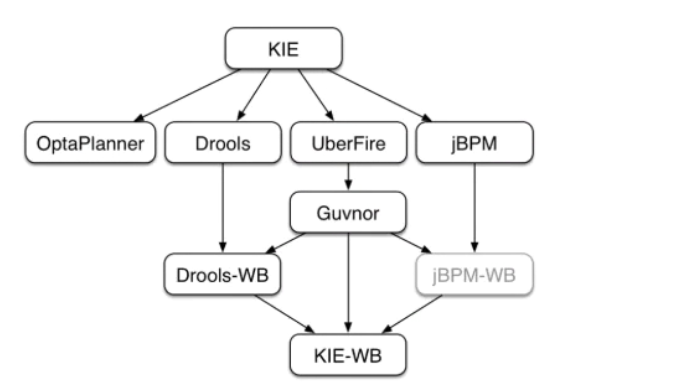
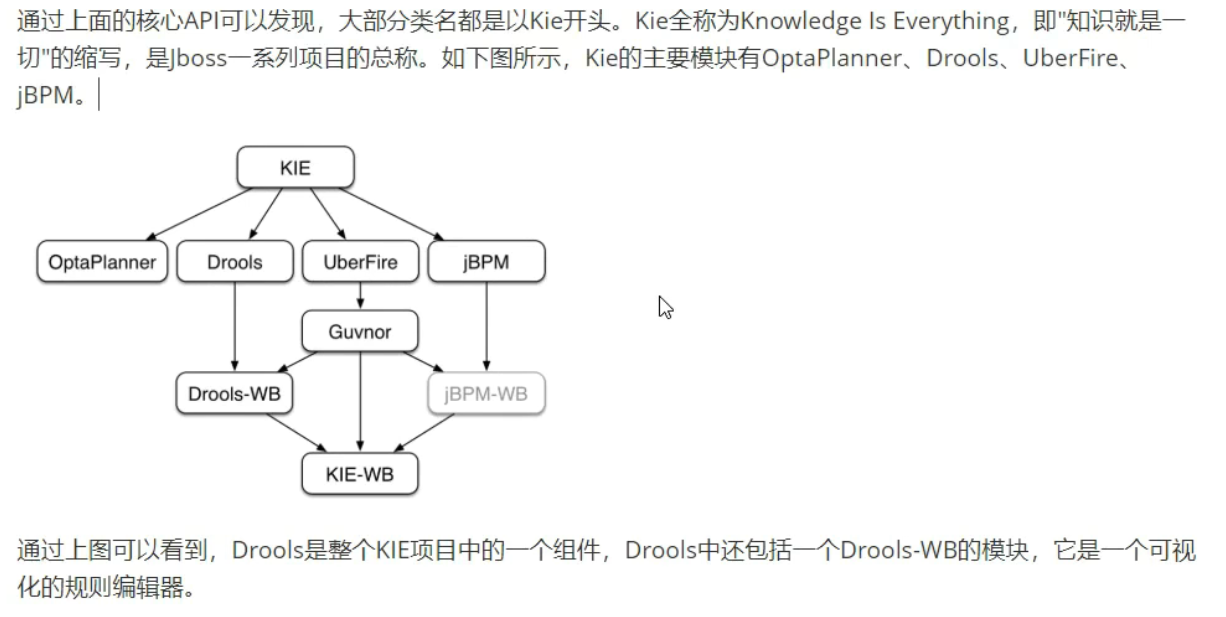
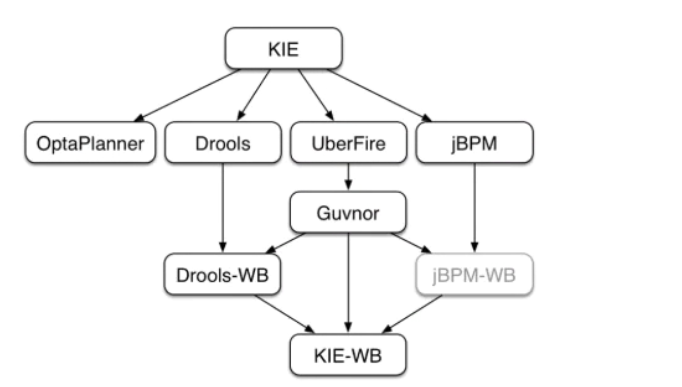
1.7 Kie介绍 KIE(Knowledgek Is Everything)
2. Drools基础语法 2.1 关键字
package:包名,只限于逻辑上的管理,同一个包名下的查询或者函数可以直接调用
import:用于导入类或者静态方法
global:全局变量
function: 自定义函数
query: 查询
rule end : 规则体
Drools支持的规则文件,除了drl形式,还有excel 文件类型的。
2.2 规则体语法结构 规则体是规则文件内容中的重要组成部分,是进行业务规则判断,处理业务结果的部分。
规则体语法结构如下:
1
2
3
4
5
6
7
rule "rule_name" attributes when LHS(Left hand side) // 为空的话,默认为true then RHS(Right hand side) end
2.3 注释
2.4 Pattern 模式匹配 Pattern语法结构为: 绑定的变量名: Object(Field约束)
官方建议绑定的变量名使用$开头
例如: $order:Order(originalPrice < 100) // 需要满足工作内存中存在Order对象, 并且这个Order对象的orginalPrice属性的值小于100
LHS部分可以定义多个pattern,多个pattern可以使用and或者or连接,例如:
1
2
3
4
5
6
7
8
9
rule "rule_discount_2" when $order :Order(originalPrice >=100 && originalPrice < 200) and $order :Order(originalPrice == 200) or $order :Order(realPrice == 1000) then $order .setRealPrice($order .getOriginalPrice() - 20); System.out.println("规则2:价格在100 - 200, 优惠20元" ); end
2.5 比较操作符
符号
说明
>
<
>=
<=
==
!=
contains
检查一个Fact对象的某个属性值是否包含一个指定的对象值
not contains
检查一个Fact对象的某个属性值是否不包含一个指定的对象值
memberOf
判断一个Fact对象的某个属性是否在一个或多个集合中
not memberOf
判断一个Fact对象的某个属性是否不在一个或多个集合中
matches
判断一个Fact对象的属性是否与提供的标准Java正则表达式进行匹配
not matches
语法
1
2
3
4
5
6
7
8
9
10
11
// contains | not contains Object(Field[Collection/Array] contains value) Object(Field[Collection/Array] not contains value) // memeberOf | not memberOf Object(feild memberOf value[Collection/Array]) Object(feild not memberOf value[Collection/Array]) // matches | not matches Object(feild matches "正则表达式" ) Object(feild not matches "正则表达式" )
案例
1
2
3
4
5
6
7
8
9
10
package com.learning.drools.entity;import lombok.Data;import java.util.List;@Data public class ComparisonOperatorEntity { private String names; private List<String> list; }
1
2
3
4
5
6
7
8
9
10
11
12
13
14
15
16
17
18
19
20
21
22
23
24
25
26
27
28
package rules import com.learning.drools.entity.ComparisonOperatorEntity // 测试contains rule "rule1" when ComparisonOperatorEntity(names contains "judy" ) //后面没有用到,所以不用绑定变量名 ComparisonOperatorEntity(list contains names) // 不写or或者and默认为and关系 then System.out.println("规则1触发:contains" ); end // 测试memberOf rule "rule2" when ComparisonOperatorEntity("tome" memberOf list) then System.out.println("规则2: memberOf" ); end // 测试matches rule "rule3" when ComparisonOperatorEntity(names matches "ju.*" ) then System.out.println("规则3: matches" ); end
1
2
3
4
5
6
7
8
9
10
11
12
13
14
15
16
17
18
19
20
21
22
23
@Test void testOperator () { KieServices kieServices = KieServices.Factory.get(); KieContainer kContainer = kieServices.newKieClasspathContainer(); KieSession kieSession = kContainer.newKieSession(); ComparisonOperatorEntity fact = new ComparisonOperatorEntity (); fact.setNames("judy" ); fact.setList(new ArrayList <>(){ { add("judy" ); add("tome" ); add("张三" ); } }); kieSession.insert(fact); kieSession.fireAllRules(); kieSession.dispose(); }
2.6 执行指定的规则
1
2
3
4
5
6
7
8
9
10
11
12
13
14
15
16
17
18
19
20
21
22
23
24
25
26
27
@Test void testCertainRule () { KieServices kieServices = KieServices.Factory.get(); KieContainer kContainer = kieServices.newKieClasspathContainer(); KieSession kieSession = kContainer.newKieSession(); ComparisonOperatorEntity fact = new ComparisonOperatorEntity (); fact.setNames("judy" ); fact.setList(new ArrayList <>(){ { add("judy" ); add("tome" ); add("张三" ); } }); kieSession.insert(fact); kieSession.fireAllRules(new RuleNameStartsWithAgendaFilter ("rule" )); kieSession.dispose(); }
2.7 Drools内置方法 规则文件的RHS部分的主要作用是通过插入,删除或者修改工作内存中的Fact数据,来达到控制规则引擎执行的目的。
Drools提供了一些方法可以用来操作工作内存中的数据,操作完成后规则引擎会重新进行相关规则的匹配。原来没有匹配成功的规则在此修改之后有可能就会匹配成功了。
1
2
3
4
5
6
7
8
9
10
package com.learning.drools.entity;import lombok.Data;@Data public class Student { private int id; private String name; private int age; }
创建规则文件
常见内置方法
update:更新fact,导致重新匹配规则
insert:插入一个fact对象到工作内存,导致规则重新匹配
retract:删除工作内存中的数据,导致规则重新匹配
1
2
3
4
5
6
7
8
9
10
11
12
13
14
15
16
17
18
19
20
21
22
23
24
25
26
27
28
29
30
31
32
33
34
35
36
37
38
39
40
41
42
43
44
45
46
47
48
49
50
51
52
53
package rules import com.learning.drools.entity.Student // 测试update内置方法 rule "stu_rule1" when $s :Student(age >= 14 && age < 18) then $s .setAge(18); update($s ); // update 更新了Fact对象,会导致规则重新匹配。所以之后stu_rule2也会执行。如果没有update,age = 15 触发了rule1但是不会触发rule2规则 System.out.println("规则1触发:" + $s ); end // 测试update内置方法, rule "stu_rule2" when $s :Student(age >= 18) then $s .setName("成年人:" + $s .getName()); System.out.println("规则2触发:" + $s ); end // 用于测试insert rule "stu_rule3" when $s :Student(id == 3 || name == "tom" ) then Student jerrySon = new Student(); jerrySon.setAge(18); insert(jerrySon); System.out.println("规则3执行" + jerrySon); end // 用于测试retract rule "stu_rule4" when $s :Student(id == 3 || name == "tom" ) then retract($s ); System.out.println("规则4执行" ); end // 用于测试retract rule "stu_rule5" when $s :Student(id == 3 || name == "tom" ) // 由于stu_rule4在工作内存中删除了这个fact,因此此规则匹配失败 then retract($s ); System.out.println("规则5执行" ); end
1
2
3
4
5
6
7
8
9
10
11
12
13
14
15
@Test void testFunction () { KieServices kieServices = KieServices.Factory.get(); KieContainer kContainer = kieServices.newKieClasspathContainer(); KieSession kieSession = kContainer.newKieSession(); Student student = new Student (); student.setId(1 ); student.setName("tom" ); student.setAge(15 ); kieSession.insert(student); kieSession.fireAllRules(); kieSession.dispose(); }
3. 规则属性 规则体的构成如下:
1
2
3
4
5
6
7
rule "rule_name" attributes when LHS then RHS end
Drools提供的属性如下表
属性名
说明
salience
指定规则的执行优先级,salience 10, 数字越大,优先级越高,越先执行 salience 11
dialect
指定规则使用的语言类型,取值为Java或mvel dialect java
enabled
指定规则是否启用 enabled true
date-effective
指定规则生效的时间 data-effective 'yyyy-MM-dd HH:mm:ss' Java代码中设置System.setProperty("drools.dateformat","yyyy-MM-dd HH:mm:ss");
date-expires
指定规则失效时间 date-expires 'date'
activation-group
激活分组,具有相同分组名称的规则只能有一个规则触发 activation-group 'group1'
agenda-group
议程分组,只有获取焦点的组中的规则才有可能触发 agenda-group 'group2' kieSession.getAgenda().getAgendaGroup("group2").setFocus(); auto-focus true
timer
定时器,指定规则触发的时间: timer(int: t1 t2) t1表示几秒后执行,t2表示每隔几秒执行一次,t2是可选参数 timer(3s 2s)timer(cron: 秒分时日月周[年]) timer(cron: 0/1 * * * * ?)
auto-focus
自动获取焦点,一般结合agenda-group一起使用 auto-focus true 组内只要有一个规则配置了,其他规则也会生效
no-loop
防止死循环 no-loop true
4. Drools高级语法
package:包名,只限于逻辑上的管理,同一个包名下的查询或者函数可以直接调用
import:用于导入类或者静态方法
global:全局变量
function: 自定义函数
query: 查询
rule end : 规则体
Drools支持的规则文件,除了drl形式,还有excel 文件类型的。
4.1 Global 全局变量 global关键字用于在规则文件中定义全局变量, 语法结构为 global 对象类型 对象名称
注意事项:
对于包装类型,在一个规则中修改了global的值,只针对该规则生效
如果是集合类型或者Java Bean时,在一个规则中修改了global的值,对于Java代码和所有的规则都生效。
1 global java.lang.Integer count
4.2 query查询 query查询提供了一种查询工作内存中符合约束条件的Fact对象的简单方法。它仅包含规则文件中的LHS部分,不用指定when 和then并且以end结束。语法结构如下:
例子
1 2 3 4 5 6 7 8 9 10 11 12 13 // test query package rules import com.learning.drools.entity.Student query "query_1" $s :Student(age == 18) end query "query_2" (String studentName) $s :Student(age < 18 && studentName == "张三" ) end
1 2 3 4 5 6 7 8 9 10 11 12 13 14 15 16 17 18 19 20 21 22 23 24 25 void testQuery () throws InterruptedException { System.setProperty("drools.dateformat" ,"yyyy-MM-dd HH:mm:ss" ); KieServices kieServices = KieServices.Factory.get(); KieContainer kContainer = kieServices.newKieClasspathContainer(); KieSession kieSession = kContainer.newKieSession(); kieSession.setGlobal("name" ,"张三" ); Student student = new Student (); student.setId(1 ); student.setName("tom" ); student.setAge(18 ); kieSession.insert(student); System.out.println(kieSession.getQueryResults("query_1" ).size()); System.out.println("==================" ); Student student1 = new Student (); student1.setId(2 ); student1.setName("张三" ); student1.setAge(15 ); kieSession.insert(student1); System.out.println(kieSession.getQueryResults("query_2" , "张三" ).size()); kieSession.dispose(); }
4.3 function 函数 function关键字可以在规则文件中定义函数,就相当于Java类中的方法一样。可以在规则体中调用定义的函数。使用函数的好处使可以将业务逻辑集中放置到一个地方,根据需要可以对函数进行修改。函数定义的语法结构如下:
1 2 3 function 返回值类型 函数名(可选参数){ //逻辑代码 }
例子:
1 2 3 4 5 6 7 8 9 10 11 12 13 14 15 16 package rules import com.learning.drools.entity.Student function String sayHello(String name){ System.out.println("函数调用" ); return "hello" + name; } rule "rule_function" when $s :Student(age > 60) then String res = sayHello($s .getName()); System.out.println("规则 then内容 : " + res); end
4.4 LHS加强 4.4.1 复合值限制in / not in 类似于SQL中的in
1 2 $s :Student(name in ("张三" ,"李四" ,"王五" ));$s :Student(name not in ("张三" ,"李四" ,"王五" ));
4.4.2 条件元素eval eval用于规则体的LHS部分,并返回一个Boolean类型的值。
1 2 3 eval (true )eval (false )eval (1 == 1)
4.4.3 条件元素 not not用于判断工作内存中是否存在某个Fact对象,如果不存在则返回true,如果存在则返回false。
1 2 3 4 5 6 rule "lhs_not" when not Student(age < 38) then System.out.println("大于38" ); end
4.4.4 条件元素exists 与not相反
1 2 3 4 5 6 rule "lhs_not" when exists Student(age < 38) then System.out.println("小于38" ); end
使用exists与不使用exists区别
1 2 exists Student() //只会触发一次 Student() //可能触发多次
4.4.5 规则继承 规则之间可以使用extends关键字进行规则条件部分的继承,类似于Java类之间的继承
例如
1 2 3 4 5 6 7 8 9 10 11 12 13 14 15 16 package rules import com.learning.drools.entity.Student rule "ext_1" when Student(age < 50) // then System.out.println("规则1触发" ); // end rule "ext_2" extends "ext_1" // when Student(age > 40) then System.out.println("规则2触发" ); end
4.5 RHS 加强 RHS是规则体的重要组成部分,当LHS部分的条件匹配成功后,对应的RHS部分就会触发执行。一般在RHS部分中需要进行业务处理。
在RHS部分Drools为我们提供了一个内置对象,名称就是drools。本小节介绍几个drools对象提供的方法
4.5.1 halt halt方法用于立即终止后面所有规则的执行
1 2 3 4 5 6 7 8 9 10 11 12 rule "rhs_halt1" when then System.out.println("halt1规则触发" ); drools.halt(); // 当前方法执行后,后续规则终止执行 end rule "rhs_halt2" when then System.out.println("halt2规则触发" ); end
4.5.2 getWorkingMemory getWorkingMembory方法用于返回工作内存对象
1 2 3 4 5 rule "rhs_getWM" when then System.out.println("工作内存对象:" + drools.getWorkingMemory().getFactCount()); end
4.5.3 getRule getRule方法的作用是返回规则对象本身
1 2 3 4 5 rule "rhs_getRule" when then System.out.println("规则本身" + drools.getRule().getName()); end
4.6 规则编码规范
所有的规则文件(drl)应统一放在一个规定的文件夹中,如何/rules文件夹
书写的每个规则应尽量加上注释。注释要清晰明了,言简意赅
同一个类型的对象尽量放在一个规则文件中,如所有Student类型的对象尽量放在一个规则文件中
规则结果部分(RHS)尽量不要有条件语句,如(if…)。尽量不要有复杂的逻辑和深层的嵌套语句
每个规则最好都加上salience属性,明确执行顺序
Drools默认dialect为java,避免使用mvel
5. SpringBoot整合Drools
1 2 3 4 5 6 7 8 9 10 11 12 13 14 15 16 17 18 19 20 21 22 23 24 25 26 27 28 29 30 31 32 33 34 35 36 37 38 39 40 41 42 43 44 45 46 47 48 49 50 51 52 53 54 55 56 57 58 59 60 61 62 63 64 65 66 67 68 69 70 71 72 73 74 75 76 77 78 79 80 81 82 83 84 85 86 87 88 89 90 91 92 93 94 95 96 97 98 99 100 101 102 103 104 105 106 107 108 109 110 111 112 113 114 115 116 117 118 <?xml version="1.0" encoding="UTF-8" ?> <project xmlns ="http://maven.apache.org/POM/4.0.0" xmlns:xsi ="http://www.w3.org/2001/XMLSchema-instance" xsi:schemaLocation ="http://maven.apache.org/POM/4.0.0 https://maven.apache.org/xsd/maven-4.0.0.xsd" > <modelVersion > 4.0.0</modelVersion > <parent > <groupId > org.springframework.boot</groupId > <artifactId > spring-boot-starter-parent</artifactId > <version > 3.5.5</version > <relativePath /> </parent > <groupId > com.learning.drools</groupId > <artifactId > drools</artifactId > <version > 0.0.1-SNAPSHOT</version > <name > drools</name > <description > drools</description > <url /> <licenses > <license /> </licenses > <developers > <developer /> </developers > <scm > <connection /> <developerConnection /> <tag /> <url /> </scm > <properties > <java.version > 17</java.version > </properties > <dependencies > <dependency > <groupId > org.springframework.boot</groupId > <artifactId > spring-boot-starter-web</artifactId > </dependency > <dependency > <groupId > org.drools</groupId > <artifactId > drools-compiler</artifactId > <version > 7.50.0.Final</version > </dependency > <dependency > <groupId > org.drools</groupId > <artifactId > drools-core</artifactId > <version > 7.50.0.Final</version > </dependency > <dependency > <groupId > org.drools</groupId > <artifactId > drools-templates</artifactId > <version > 7.50.0.Final</version > </dependency > <dependency > <groupId > org.kie</groupId > <artifactId > kie-api</artifactId > <version > 7.50.0.Final</version > </dependency > <dependency > <groupId > org.kie</groupId > <artifactId > kie-spring</artifactId > <exclusions > <exclusion > <groupId > org.springframework</groupId > <artifactId > spring-tx</artifactId > </exclusion > <exclusion > <groupId > org.springframework</groupId > <artifactId > spring-beans</artifactId > </exclusion > <exclusion > <groupId > org.springframework</groupId > <artifactId > spring-core</artifactId > </exclusion > <exclusion > <groupId > org.springframework</groupId > <artifactId > spring-context</artifactId > </exclusion > </exclusions > <version > 7.50.0.Final</version > </dependency > <dependency > <groupId > org.springframework.boot</groupId > <artifactId > spring-boot-starter-test</artifactId > <scope > test</scope > </dependency > <dependency > <groupId > org.projectlombok</groupId > <artifactId > lombok</artifactId > <scope > annotationProcessor</scope > </dependency > </dependencies > <build > <plugins > <plugin > <groupId > org.springframework.boot</groupId > <artifactId > spring-boot-maven-plugin</artifactId > </plugin > </plugins > </build > </project >
1 2 3 4 5 6 7 8 9 10 11 12 13 14 15 16 17 18 19 20 21 22 23 24 25 26 27 28 29 30 package com.learning.drools.config;import org.kie.api.KieBase;import org.kie.api.KieServices;import org.kie.api.runtime.KieContainer;import org.springframework.boot.autoconfigure.condition.ConditionalOnMissingBean;import org.springframework.context.annotation.Bean;import org.springframework.context.annotation.Configuration;@Configuration public class DroolsConfig { private final KieServices kieServices = KieServices.Factory.get(); @Bean @ConditionalOnMissingBean public KieBase kieBase () { System.setProperty("drools.dateformat" ,"yyyy-MM-dd HH:mm:ss" ); KieContainer kContainer = kieServices.newKieClasspathContainer(); return kContainer.getKieBase(); } @Bean @ConditionalOnMissingBean public KieContainer kieContainer () { return kieServices.newKieClasspathContainer(); } }
1 2 3 4 5 6 7 8 9 10 @Service public class RuleService { @Autowired private KieBase kieBase; public void rule () { KieSession kieSession = kieBase.newKieSession(); kieSession.fireAllRules(new RuleNameStartsWithAgendaFilter ("hello" )); kieSession.dispose(); } }
1 2 3 4 5 6 7 8 9 10 11 12 13 14 @RestController public class RuleController { @Autowired private RuleService ruleService; @GetMapping("/rule") public String rule () { ruleService.rule(); return "success" ; } }
6. WorkBench
Drools是整个KIE项目中的一个组件,Drools还包括一个Drools-WB的模块,它是一个可视化的规则编辑器。
使用workbench可以在浏览器中创建数据对象,创建规则文件,创建测试场景并将规则部署到maven仓库供其他应用使用。
1 docker pull jboss/business-central-workbench:7.52.0.Final
1 docker run -p 8080:8080 -p 8001:8001 -d --name workbench jboss/business-central-workbench:7.50.0.Final
1 2 3 4 ./add-user.sh -a -u kieserver -p kieserver1! -g kie-server ./add-user.sh -a -u workbench -p workbench! -g admin,kie-server,rest-all
1 2 3 4 5 6 7 8 9 10 11 12 13 ROLE DESCRIPTION ************************************************* admin The administrator analyst The analyst kiemgmt KIE management user rest-all Rest API permissions Accounting Accounting role PM Project manager role HR Human resources role sales Sales role IT IT role
6.1 使用方式
创建空间、项目
创建数据对象
创建DRL规则文件
创建测试场景
设置KieBase和KieSession
kieBase的软件包就是drl的package地址
kiesession有两种状态
stateful
stateless
7. 案例 7.1 个人所得税计算 7.1.1 计算规则
规则编号
名称
描述
1
计算应纳税所得额
税前工资 - 5000
2
设置税率,应纳税所得额 <= 1500
税率0.03, 速算扣除数为0
3
设置税率,应纳税所得额 <= 4500
税率0.1, 速算扣除数为105
4
设置税率,应纳税所得额 <= 9000
税率0.2, 速算扣除数为555
5
设置税率,应纳税所得额 <= 35000
税率0.25, 速算扣除数为1005
6
设置税率,应纳税所得额 <= 55000
税率0.3, 速算扣除数为2755
7
设置税率,应纳税所得额 <= 80000
税率0.35, 速算扣除数为5505
8
设置税率,应纳税所得额 > 80000
9
计算税后工资
扣税额 = 应缴纳税所得额*税率 - 速算扣除数
7.1.2 编写drl 1 2 3 4 5 6 7 8 9 10 11 12 13 14 15 16 17 18 19 20 21 22 23 24 25 26 27 28 29 30 31 32 33 34 35 36 37 38 39 40 41 42 43 44 45 46 47 48 49 50 51 52 53 54 55 56 57 58 59 60 61 62 63 64 65 66 67 68 69 70 71 72 73 74 75 76 77 78 79 80 81 82 83 84 85 86 87 88 89 90 91 92 93 94 95 96 97 98 99 100 101 102 103 104 105 106 107 108 109 110 111 112 113 114 115 116 117 118 119 120 121 122 123 124 125 126 127 128 package rules import com.learning.drools.owntax.entity.Calculation rule "r1" when then System.out.println("ok" ); end // 第一类: 计算应纳税所得额 // 第二类: 计算税 // 第三类: 计算税后工资 /** private double wage; // 税前工资 private double wageMore; // 应纳税所得额 private double cess;// 税率 private double preMinus; //速算扣除数 private double wageMinus; // 扣税额 private double actualWage; //税后工资 */ rule "计算应纳税所得额" salience 100 date-effective "2022-09-01" no-loop true // 防止更改后发生死循环 when $cal :Calculation(wage > 5000) then $cal .setWageMore($cal .getWage() - 3500); update($cal ); // 工作内存中更新 end rule "设置税率,应纳税所得额 <= 1500" salience 99 date-effective "2022-09-01" activation-group "SetCessGroup" // 保证计算税率的规则只能有一个规则被触发 no-loop true when $cal :Calculation(wageMore > 0 && wageMore <= 1500) then $cal .setCess(0.03); $cal .setPreMinus(0); $cal .setWageMinus($cal .getWageMore() * $cal .getCess() - $cal .getPreMinus()); update($cal ); // 工作内存中更新 end rule "设置税率,应纳税所得额 <= 4500" salience 98 date-effective "2022-09-01" activation-group "SetCessGroup" // 保证计算税率的规则只能有一个规则被触发 no-loop true when $cal :Calculation(wageMore > 1500 && wageMore <= 4500) then $cal .setCess(0.1); $cal .setPreMinus(105); $cal .setWageMinus($cal .getWageMore() * $cal .getCess() - $cal .getPreMinus()); update($cal ); // 工作内存中更新 end rule "设置税率,应纳税所得额 <= 9000" salience 97 date-effective "2022-09-01" activation-group "SetCessGroup" // 保证计算税率的规则只能有一个规则被触发 no-loop true when $cal :Calculation(wageMore > 4500 && wageMore <= 9000) then $cal .setCess(0.2); $cal .setPreMinus(555); $cal .setWageMinus($cal .getWageMore() * $cal .getCess() - $cal .getPreMinus()); update($cal ); // 工作内存中更新 end rule "设置税率,应纳税所得额 <= 35000" salience 96 date-effective "2022-09-01" activation-group "SetCessGroup" // 保证计算税率的规则只能有一个规则被触发 no-loop true when $cal :Calculation(wageMore > 9000 && wageMore <= 35000) then $cal .setCess(0.25); $cal .setPreMinus(1005); $cal .setWageMinus($cal .getWageMore() * $cal .getCess() - $cal .getPreMinus()); update($cal ); // 工作内存中更新 end rule "设置税率,应纳税所得额 <= 55000" salience 95 date-effective "2022-09-01" activation-group "SetCessGroup" // 保证计算税率的规则只能有一个规则被触发 no-loop true when $cal :Calculation(wageMore > 35000 && wageMore <= 55000) then $cal .setCess(0.3); $cal .setPreMinus(2755); $cal .setWageMinus($cal .getWageMore() * $cal .getCess() - $cal .getPreMinus()); update($cal ); // 工作内存中更新 end rule "设置税率,应纳税所得额 <= 80000" salience 94 date-effective "2022-09-01" activation-group "SetCessGroup" // 保证计算税率的规则只能有一个规则被触发 no-loop true when $cal :Calculation(wageMore > 55000 && wageMore <= 80000) then $cal .setCess(0.5); $cal .setPreMinus(5505); $cal .setWageMinus($cal .getWageMore() * $cal .getCess() - $cal .getPreMinus()); update($cal ); // 工作内存中更新 end rule "计算税后工资" salience 93 date-effective "2022-09-01" no-loop true when $cal :Calculation(wage > 0) then $cal .setActualWage($cal .getWage() - $cal .getWageMinus()); update($cal ); // 工作内存中更新 end
7.1.3 配置 1 2 3 4 5 6 7 8 9 10 11 12 13 14 15 16 17 18 @Configuration public class DroolsConfig { private final KieServices kieServices; DroolsConfig(){ System.setProperty("drools.dateformat" ,"yyyy-MM-dd" ); kieServices = KieServices.Factory.get(); } @Bean @ConditionalOnMissingBean public KieBase kieBase () { KieContainer kieContainer = kieServices.newKieClasspathContainer(); return kieContainer.getKieBase(); } }
1 2 3 4 5 6 7 8 <kmodule xmlns ="http://www.drools.org/xsd/kmodule" > <kbase name ="myKbase1" packages ="rules" default ="true" > <ksession name ="ksession-rule" default ="true" /> </kbase > </kmodule >
7.1.4 java代码
1 2 3 4 5 6 7 8 9 10 11 12 @RestController public class OwnTaxController { @Autowired private OwnTaxService ownTaxService; @GetMapping("/calc/{wage}") public Calculation calc ( @PathVariable Double wage) { return ownTaxService.CalculateOwnTax(wage); } }
1 2 3 4 5 6 7 8 9 10 11 12 13 14 15 16 17 18 19 20 @Service public class OwnTaxService { @Autowired private KieBase kieBase; public Calculation CalculateOwnTax (Double wage) { Calculation calculation = new Calculation (); calculation.setWage(wage); KieSession kieSession = kieBase.newKieSession(); kieSession.insert(calculation); kieSession.fireAllRules(); kieSession.dispose(); return calculation; } }
1 2 3 4 5 6 7 8 9 10 11 12 package com.learning.drools.owntax.entity;import lombok.Data;@Data public class Calculation { private double wage; private double wageMore; private double cess; private double preMinus; private double wageMinus; private double actualWage; }
7.2 信用卡申请 7.2.1 计算规则
规则编号
名称
描述
1
检查学历与薪水
如果申请人没房没车,同时学历大专以下,月薪少于5000,那么不通过
2
检查学历与薪水
如果申请人没房没车,同时学历大专或本科,并且月薪少于3000,那么不通过
3
检查学历与薪水
如果申请人没房也没车,同时学历为本科以上,并且月薪少于2000,同时之前没有信用卡的,那么不通过
4
检查申请人已有的信用卡数量
如果申请人现有的信用卡数量大于10,那么不通过
规则编号
名称
描述
1
规则1
如果申请人有房有车,或者月收入在20000以上,那么额度为15000
2
规则2
没房没车,收入在10000 ~ 20000,额度为6000
3
规则3
没房没车,收入在10000以下,额度为3000
4
规则4
有房没车或者有车没房,收入在10000以下,额度为5000
5
规则5
有房没车或者有车没房,收入在10000~20000,额度为8000
7.2.2 配置 1 2 3 4 5 6 7 8 9 10 11 12 13 14 15 16 17 18 19 20 21 22 23 24 25 26 27 28 29 30 31 32 33 34 35 36 37 <dependencies > <dependency > <groupId > org.springframework.boot</groupId > <artifactId > spring-boot-starter-web</artifactId > </dependency > <dependency > <groupId > org.projectlombok</groupId > <artifactId > lombok</artifactId > <optional > true</optional > </dependency > <dependency > <groupId > org.springframework.boot</groupId > <artifactId > spring-boot-starter-test</artifactId > <scope > test</scope > </dependency > <dependency > <groupId > org.drools</groupId > <artifactId > drools-compiler</artifactId > <version > 7.50.0.Final</version > </dependency > <dependency > <groupId > org.drools</groupId > <artifactId > drools-core</artifactId > <version > 7.50.0.Final</version > </dependency > <dependency > <groupId > org.drools</groupId > <artifactId > drools-templates</artifactId > <version > 7.50.0.Final</version > </dependency > </dependencies >
1 2 3 4 5 6 7 8 9 <?xml version="1.0" encoding="UTF-8" ?> <kmodule xmlns ="http://www.drools.org/xsd/kmodule" > <kbase name ="myKbase1" packages ="rules" default ="true" > <ksession name ="ksession-rule" default ="true" /> </kbase > </kmodule >
1 2 3 4 5 6 7 8 9 10 11 12 13 14 15 16 17 18 @Configuration public class DroolsConfig { private final KieServices kieServices; DroolsConfig(){ System.setProperty("drools.dateformat" ,"yyyy-MM-dd" ); kieServices = KieServices.Factory.get(); } @Bean @ConditionalOnMissingBean public KieBase kieBase () { KieContainer kieContainer = kieServices.newKieClasspathContainer(); return kieContainer.getKieBase(); } }
7.2.3 编写drl 1 2 3 4 5 6 7 8 9 10 11 12 13 14 15 16 17 18 19 20 21 22 23 24 25 26 27 28 29 30 31 32 33 34 35 36 37 38 39 40 41 42 43 44 45 46 47 48 49 50 51 52 53 54 55 56 57 58 59 60 61 62 63 64 65 66 67 68 69 70 71 72 73 74 75 76 77 78 79 80 81 82 83 84 85 86 87 88 89 90 91 92 93 94 95 96 97 98 99 100 101 102 103 104 105 106 107 108 109 110 package rules import com.learning.drools.owntax.entity.Person // 合法性检查 rule "检查学历或薪水1" salience 100 activation-group "credit_check" no-loop true when $person :Person(!hasHouse && !hasCar && salary < 5000 && educationCode < 1) then $person .setHasCredit(false ); update($person ) drools.halt(); // 审核不通过直接退出 end rule "检查学历或薪水2" salience 99 activation-group "credit_check" no-loop true when $person :Person(!hasHouse && !hasCar && salary < 3000 && (educationCode == 1 || educationCode == 2)) then $person .setHasCredit(false ); update($person ) drools.halt(); // 审核不通过直接退出 end rule "检查学历或薪水3" salience 98 activation-group "credit_check" no-loop true when $person :Person(!hasHouse && !hasCar && salary < 2000 && educationCode > 2 && creditCardNum <= 0) then $person .setHasCredit(false ); update($person ) drools.halt(); // 审核不通过直接退出 end rule "检查学历或薪水4" salience 97 activation-group "credit_check" no-loop true when $person :Person(creditCardNum > 10) then $person .setHasCredit(false ); update($person ) drools.halt(); // 审核不通过直接退出 end // 信用卡额度 rule "信用卡额度规则1" salience 90 activation-group "credit_quota" no-loop true when $person :Person( hasCredit && (hasCar && hasHouse || salary > 20000) ) then $person .setQuota(15000.0); update($person ) System.out.println($person ); end rule "信用卡额度规则2" salience 89 activation-group "credit_quota" no-loop true when $person :Person( hasCredit && (!hasCar && !hasHouse && (salary >= 10000 && salary <= 20000)) ) then $person .setQuota(6000.0); update($person ) end rule "信用卡额度规则3" salience 88 activation-group "credit_quota" no-loop true when $person :Person( hasCredit && (!hasCar && !hasHouse && salary < 10000) ) then $person .setQuota(3000.0); update($person ) end rule "信用卡额度规则4" salience 87 activation-group "credit_quota" no-loop true when $person :Person( hasCredit && (hasCar || hasHouse) && salary < 10000) then $person .setQuota(5000.0); update($person ) end rule "信用卡额度规则5" salience 86 activation-group "credit_quota" no-loop true when $person :Person( hasCredit && (hasCar || hasHouse) && ( salary > 10000 && salary <= 20000)) then $person .setQuota(8000.0); update($person ) end
7.2.4 Java代码 1 2 3 4 5 6 7 8 9 10 11 12 13 14 15 @Service public class CredCardService { @Autowired private KieBase kieBase; public Person executeRule (Person person) { KieSession kieSession = kieBase.newKieSession(); kieSession.insert(person); kieSession.fireAllRules(); kieSession.dispose(); return person; } }
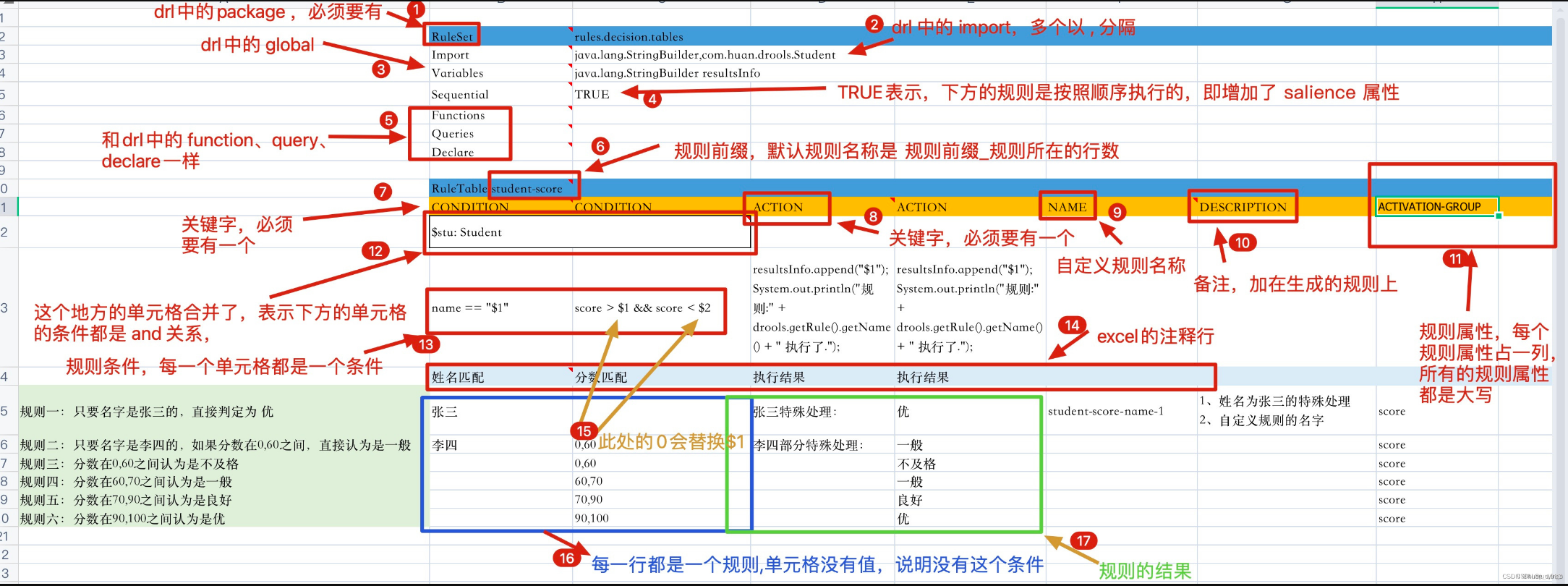
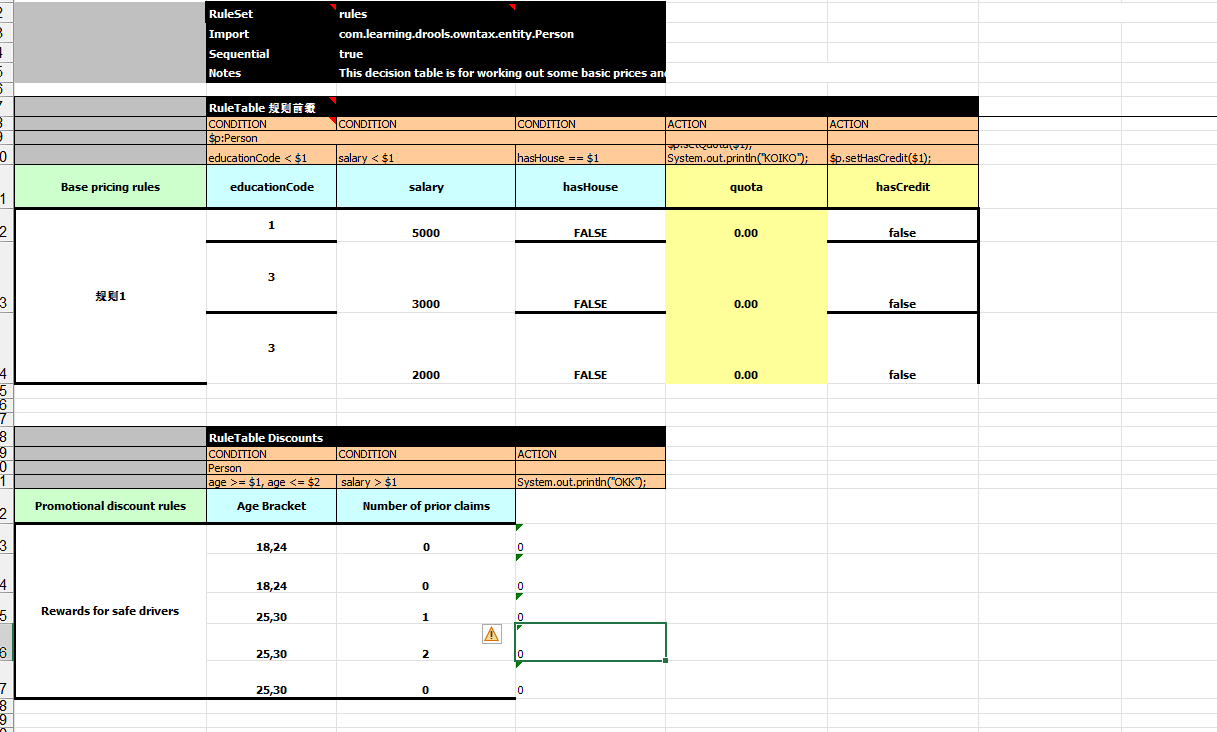
7.3 保险产品准入规则 7.3.1 决策表 Drools除了支持drl形式的文件外,还支持xls格式的文件(即,excel文件)。这种xls格式的文件通常称为决策表(decision table)。
决策表是一个“精确而紧凑的”表示条件逻辑的方式,非常适合商业级别的规则。决策表与现有的drl文件可以无缝替换。Drools提供了响应的API可以将xls文件编译为drl格式的字符串。
决策表语法:
关键字
说明
是否必须
RuleSet
相当于drl文件中的package
必须,只能有一个。如果没有设置RuleSet对应的值,则使用默认rule_table
Sequential
取值为Boolean,true表示规则从上到下顺序执行,false表示乱序
可选
Import
相当于drl中的import,用逗号分隔
可选
Variables
相当于drl 中的global,如果有多个全局变量则中间用逗号分隔
可选
RuleTable
它指示了后面将会有一批rule,RuleTable的名称将会作为以后生成rule的前缀
必须
CONDITION
规则条件关键字,相当于drl文件中的when。下面两行则表示LHS部分,第三行为注释行,从第四行开始,每一行代表一条规则
每一个规则至少有一个
ACTION
相当于drl中的then
每个规则至少一个
NO-LOOP
可选
AGENDA-GROUP
议程分组,只有获取焦点的组中的规则才有可能触发 agenda-group 'group2' kieSession.getAgenda().getAgendaGroup("group2").setFocus(); auto-focus true
可选
在决策表中经常使用到占位符,语法为$number,用于替换每条规则中设置的具体值。
7.3.2 测试案例
1 2 3 4 5 6 7 8 9 10 11 public static KieSession getKieSessionByXML (String realPath) throws FileNotFoundException { File file = new File (realPath); FileInputStream fileInputStream = new FileInputStream (file); SpreadsheetCompiler compiler = new SpreadsheetCompiler (); String compile = compiler.compile(fileInputStream, InputType.XLS); System.out.println(compile); KieHelper kieHelper = new KieHelper (); kieHelper.addContent(compile, ResourceType.DRL); return kieHelper.build().newKieSession(); }
1 2 3 4 5 6 7 8 9 10 11 12 @Test void contextLoads () throws FileNotFoundException { KieSession kieSessionByXML = KieSessionUtils.getKieSessionByXML("D:\\Users\\fei\\gitrepo\\owntax\\src\\main\\resources\\rules\\decisionTable.xls" ); Person person = new Person (); person.setAge(20 ); person.setSalary(34.0 ); kieSessionByXML.insert(person); kieSessionByXML.fireAllRules(); kieSessionByXML.dispose(); }
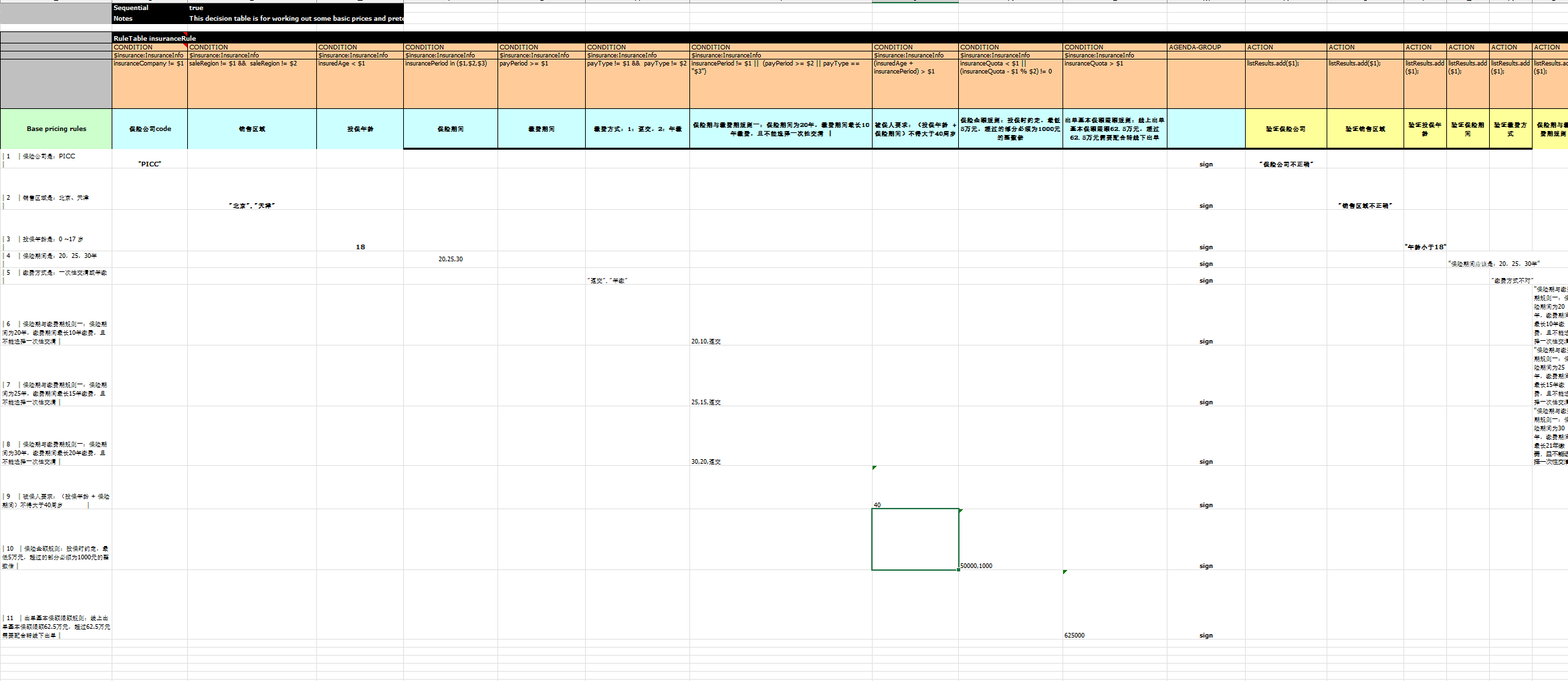
7.3.3 规则说明 以下规则全部满足才能准入成功
规则编号
说明
1
保险公司是:PICC
2
销售区域是:北京、天津
3
投保年龄是:0 ~17 岁
4
保险期间是:20,25,30年
5
缴费方式是:一次性交清或年缴
6
保险期与缴费期规则一:保险期间为20年,缴费期间最长10年缴费,且不能选择一次性交清
7
保险期与缴费期规则一:保险期间为25年,缴费期间最长15年缴费,且不能选择一次性交清
8
保险期与缴费期规则一:保险期间为30年,缴费期间最长20年缴费,且不能选择一次性交清
9
被保人要求:(投保年龄 + 保险期间)不得大于40周岁
10
保险金额规则:投保时约定,最低5万元,超过的部分必须为1000元的整数倍
11
出单基本保额限额规则:线上出单基本保额限额62.5万元,超过62.5万元需要配合转线下出单
本案例中规则文件是一个excel文件,业务人员可以直接更改这个文件中指标的值,系统不需要做任何变更
7.3.4 配置 同上
7.3.5 编写决策表
7.3.6 Java代码
1 2 3 4 5 6 7 8 9 10 11 12 13 14 15 16 public static KieSession getKieSessionByXML (String realPath) throws FileNotFoundException { File file = new File (realPath); FileInputStream fileInputStream = new FileInputStream (file); SpreadsheetCompiler compiler = new SpreadsheetCompiler (); String compile = compiler.compile(fileInputStream, InputType.XLS); System.out.println(compile); KieHelper kieHelper = new KieHelper (); kieHelper.addContent(compile, ResourceType.DRL); Results verify = kieHelper.verify(); if (verify.hasMessages(Message.Level.ERROR)) { System.out.println("规则文件语法异常 Errors found: " + verify.getMessages(Message.Level.ERROR)); } return kieHelper.build().newKieSession(); }
1 2 3 4 5 6 7 8 9 public List<String> insuranceInfoCheck (InsuranceInfo insuranceInfo) throws Exception { KieSession kieSession = KieSessionUtils.getKieSessionByXML("D:\\Users\\fei\\gitrepo\\owntax\\src\\main\\resources\\rules\\insurance.xls" ); kieSession.getAgenda().getAgendaGroup("sign" ).setFocus(); kieSession.insert(insuranceInfo); ArrayList<String> listRules = new ArrayList <>(); kieSession.setGlobal("listResults" , listRules); kieSession.fireAllRules(); return listRules; }